
Claude Desktop Privacy: What It Sends to Whom, 9 Contested Practices
 Kaamel Lab
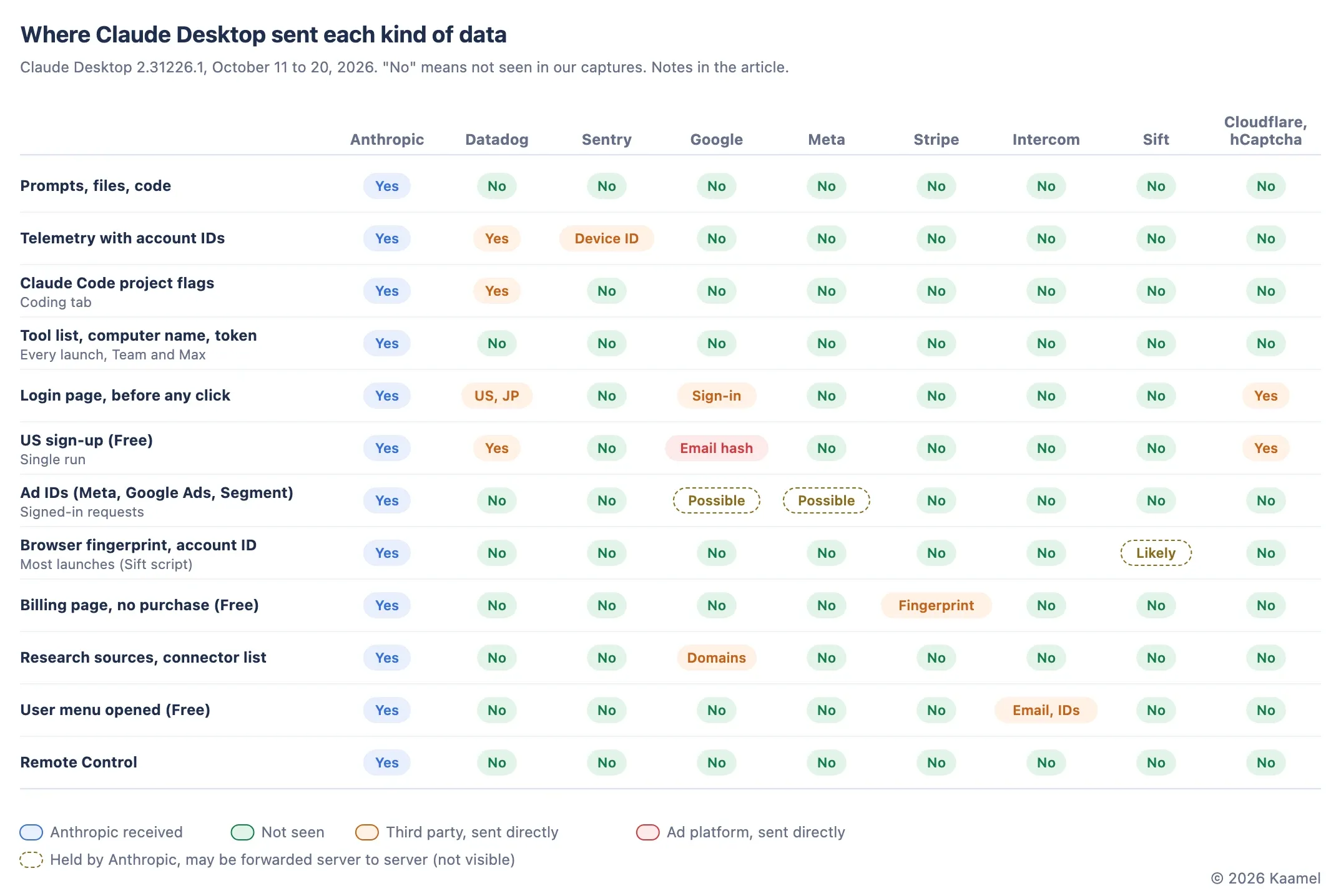
In our client-side tests, Claude Desktop sent prompts, files and code only to Anthropic. The privacy problems sit around that content: a US sign-up sent a hashed email to Google Ads, an opt-out made on the web did not reach the desktop app, the app loads code for eight ad pixels and keeps ad IDs in its requests, and on Team and Max accounts every launch registers the Mac’s tools with an Anthropic server. We tested Claude Desktop for macOS from install to quit, signed out and signed in, from the US, Germany and Japan, and rank nine contested practices below by severity. EU and US users are treated differently, but the difference follows the IP address.
We reported the issues below to Anthropic approximately one week before this update. We have not yet verified whether they have been fixed in the latest release; the findings describe the versions and scenarios identified in this article.
Key takeaways
- Content stayed with Anthropic: none of the marker strings we planted in prompts, files, web pages and code appeared in any third-party request we could read; hCaptcha’s encoded bot checks could not be inspected. Identifiers and telemetry did reach third parties, mainly Datadog, a monitoring service, and in specific scenarios Google, Intercom and Stripe.
The five most serious practices:
- Sign-up (Free account, US): the sign-up sent a SHA-256 hash of the account email to Google Ads before any opt-out could be reached. A hashed email remains matchable to the same address.
- Opt-out: the ad opt-out sits three levels deep in the user menu, and in our test a choice made on the web left the desktop app’s ad IDs and analytics running. Only a choice made inside the app stopped them.
- Ad pixels: at sign-in the app loads a page with code for eight ad pixels from seven companies, keeps Meta and Segment ad IDs in its requests to claude.ai, Team workspace included, and marks page views for dormant Reddit and Bing pixels.
- Relay (Team and Max, not Free): every launch opens an authenticated connection to Anthropic’s relay, through which the cloud can ask the Mac to run tools, and registers the computer name and the Mac’s tool list, even with no cloud session running. On Max the list included screen, click and clipboard tools while computer use was off.
- Telemetry: Datadog, which is not on Anthropic’s sub-processor list, receives account and organization IDs, the plan, the IDs of pages you open and Claude Code’s flags about your project, such as whether it has a
.envfile. Anthropic’s own event log has no control in the desktop Settings pages.
Items 6 to 9 cover a fraud-detection fingerprint served from Anthropic’s own domain, the coding tab’s Auto mode, Remote Control and smaller gaps. “Contested” means undisclosed, hard to turn off or legally sensitive; it does not mean unlawful.
Earlier articles in our series on privacy across the AI supply chain, such as the one on AI agents, worked from vendor documents. This one tests a product.
Test method and boundaries
We ran Claude Desktop 2.31226.1 for macOS in a virtual machine cloned fresh for every run, between October 11 and 20, 2026. Each run was captured three ways: a decrypting proxy, a packet capture of everything leaving the machine, and per-process connection tables. We planted unique marker strings in prompts, files, web pages, photo metadata, code repositories and attachments, and searched every request for them. A VPN set the country our traffic came from: the US, Germany or Japan.
We tested four states: signed out on a clean install; a company workspace on Team, Anthropic’s business plan; a new account on Free, the entry consumer plan; and an account on Max, the top consumer plan, which belongs to one of us, who signed in personally. The coding tab runs Claude Code, Anthropic’s coding agent. Where a finding comes from a single run, we say so; behavior may differ in later builds and under other organizations’ settings.
We ran the tests with Claude, which wrote and operated the test harness; Claude is made by Anthropic, the vendor we audited. Kaamel’s team chose what to test and set the ranking criteria. All testing used our own accounts and devices inside controlled virtual machines, with the Team workspace used with our company’s agreement, and touched no one else’s data.
Screenshots are cropped from the test runs, with account names and email addresses masked. We do not publish the raw captures because they contain live tokens and account IDs.
Which data goes where, scenario by scenario?
Content stays with Anthropic; the data around it reaches a few third parties, and most contested practices sit in that layer. Every scenario also sends data to Anthropic. In the table, “None” means only Anthropic received the data, and “None seen” means it went to Anthropic and any onward sharing is out of a client’s view.
| Scenario | What is sent | Third parties | Item |
|---|---|---|---|
| Sign-up (Free, US) | Hashed email, conversion events | Google Ads, DoubleClick | 1 |
| Signed in, after a web opt-out | Ad IDs, Datadog monitoring | Datadog | 2 |
| Signed in (Team, Free) | Meta and Segment ad IDs | None seen | 3 |
| Signed in (Free) | Google Ads ad ID | None seen | 3 |
| Every launch (Team, Max) | Computer name, tool list | None | 4 |
| Signed in, any activity | Account IDs, page IDs, project flags | Datadog, Sentry | 5 |
| Most launches | Browser fingerprint, account ID | None seen (Sift’s script) | 6 |
| Coding tab in Auto mode | Home folder, username, git state, rules | None | 7 |
| Remote Control | Host name, working directory, whole transcript | None | 8 |
| Billing page, no purchase (Free) | Browser fingerprint | Stripe | 9 |
| Using Research, opening connector settings | Source and connector domains | 9 | |
| User menu opened (Free) | Email, account and organization IDs | Intercom | 9 |
| Photo attachments | Photo metadata | None | 9 |
| Chat, files, web pages | Content | None | None |
Inside the app, Datadog browser monitoring goes through Anthropic’s own endpoint claude.ai/api/v2/rum; on the login page it goes straight to Datadog. We count both as Datadog. In the figure, dashed cells mark data that went to Anthropic but is usually meant for a third party: the ad IDs, which Meta’s and Google’s server-side conversion APIs accept, and the fingerprint from Sift’s script, which Sift, a listed sub-processor, likely receives. Any onward transfer would happen server to server and cannot be established from the client capture. The login page also loads Cloudflare and hCaptcha bot checks; both are on Anthropic’s sub-processor list, the vendors Anthropic discloses as processing customer data for it.
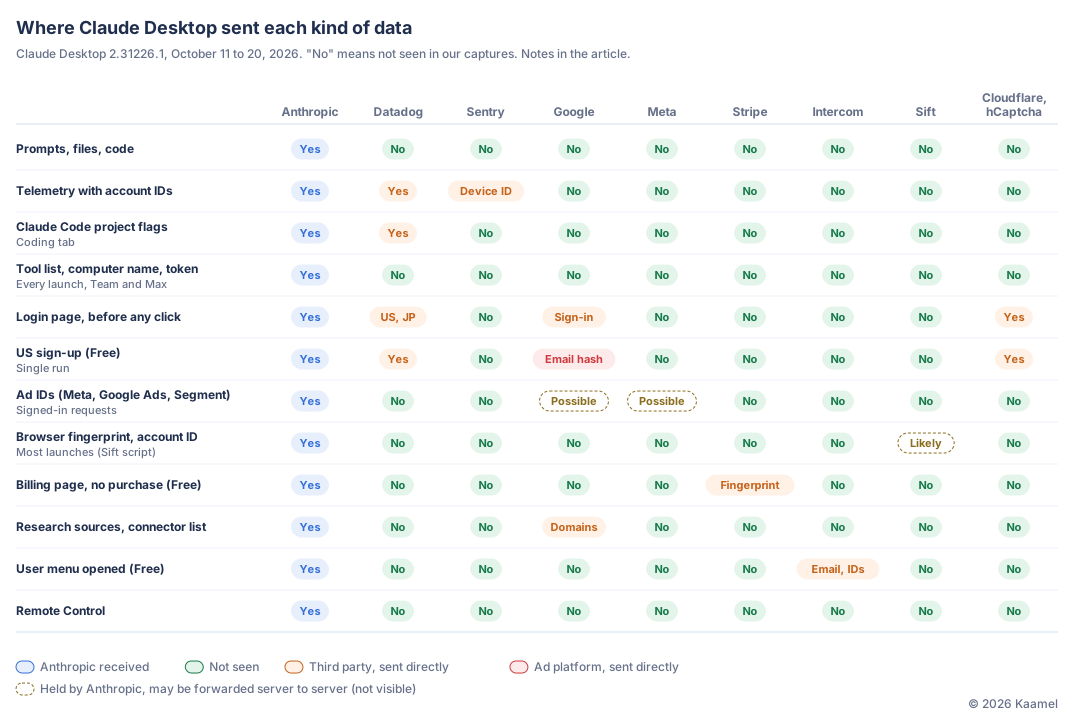
Which practices are contested, and how serious are they?
Nine, most serious first. We rank by what data is sent in which scenario and whether that scenario needs it, then by who receives it (an ad platform before a vendor, a vendor before Anthropic), what the connection lets the receiver do, whether the user can stop it, and whether Anthropic discloses it.
1. A US sign-up sends a hashed email address to Google Ads
When we created a Free account from a US exit, a hidden page loaded Google Tag Manager at the end of sign-up and sent Google Ads conversion calls reporting the sign-up for advertising measurement. Their em= parameter, used by Google’s enhanced-conversions feature, carried the SHA-256 hash of the account email, which we matched against the hash of the lowercased address, along with the screen size and macOS version. The page also sent a Floodlight call, Google’s ad-conversion tracker in its DoubleClick products. This was one run.
Creating an account does not need this. The account had been created with Google sign-in, so Google already held the address; the conversion calls tie that person’s sign-up to Google’s ad measurement. They went out before the user menu, where the opt-out lives, could be reached; only a Global Privacy Control (GPC) signal, which the desktop app cannot send, would have stopped them. Anthropic’s cookie table lists Google advertising cookies under Targeted Marketing, but no document we found says a hash of the account email goes to Google at sign-up.
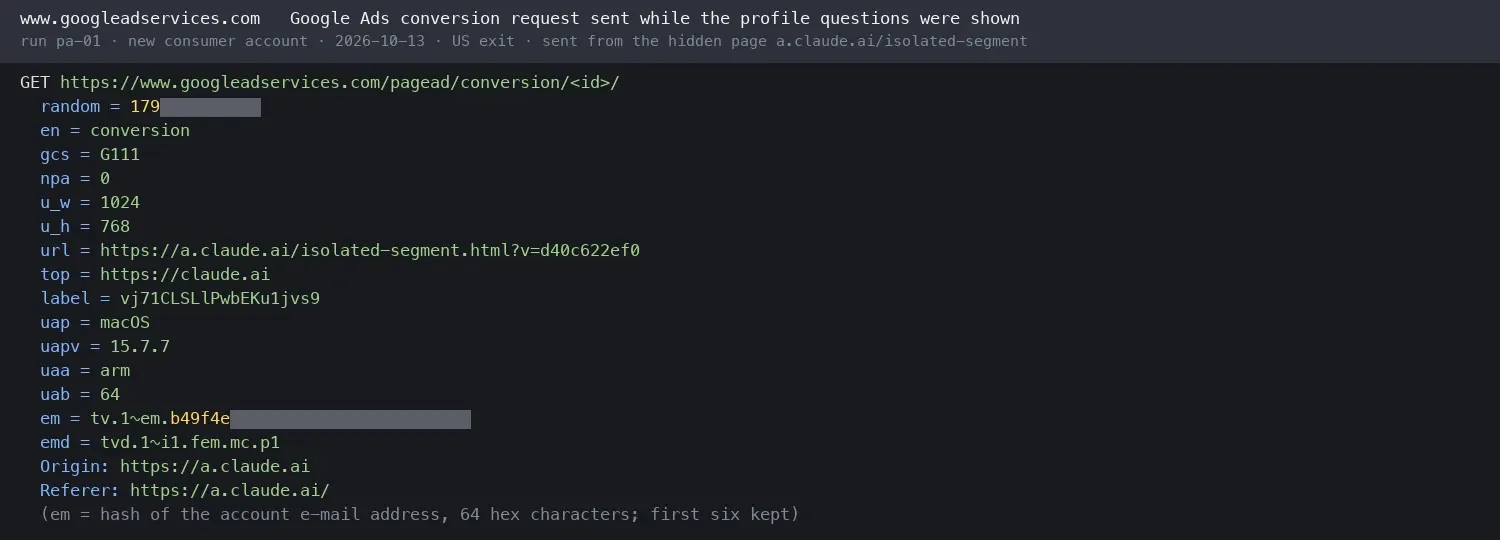
FTC technologists have written that hashing does not make data anonymous, citing BetterHelp, which the FTC ordered to pay $7.8 million after it shared hashed client emails, along with health information, with Facebook. Under the California Consumer Privacy Act (CCPA), giving an identifier to an ad platform for cross-context behavioral advertising is “sharing”, and the platform cannot be a service provider, a vendor that uses the data only for the business, for that purpose. The calls carried no restricted-processing signal, marked consent as granted and allowed personalized ads (npa=0). Whether Google acts as a service provider depends on Anthropic’s contract and Google Ads account settings, which a client cannot see; but the same page sets restricted data use for the Meta and TikTok pixels and not for Google.
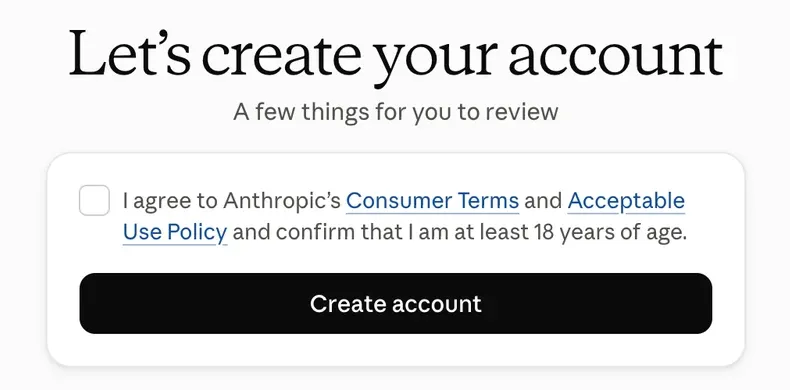
One checkbox also covered marketing email. The sign-up screen used a single unchecked box for the Consumer Terms, the Acceptable Use Policy and the 18+ confirmation. Checking it also recorded marketing-email consent as true, though the box does not mention email; only a line on the login page does. CAN-SPAM, the US federal email law, requires no prior consent. We saw this on a US sign-up; where consent is the basis for marketing email, as is usual in the UK and the EU, regulators expect it to be separate from the terms.
2. The opt-out sits three levels down, and a web choice did not reach the desktop app
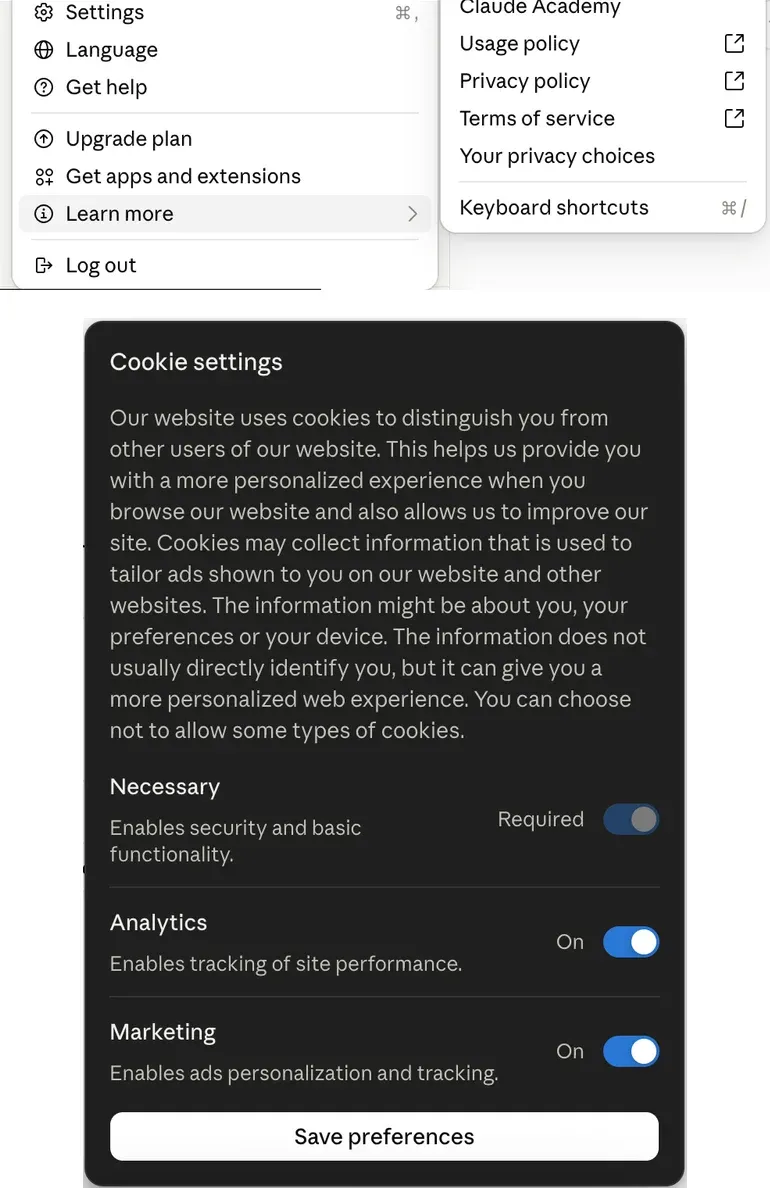
The ad opt-out is a cookie panel, Your privacy choices, with Analytics and Marketing switches. In the desktop app and on claude.ai the path is the same:
- open the user menu at the bottom left;
- choose Learn more;
- choose Your privacy choices;
- in the desktop app a cookie banner opens: choose Reject all cookies, or Customize cookie settings to choose; on claude.ai, turn the switches off and save.
Nothing in Settings points to it, and the desktop app sends no GPC signal. The Privacy Policy says Anthropic shares personal data for targeted advertising and honors global privacy controls, but the opt-out link next to that sentence goes to the Cookie Policy. For a US consumer account both switches start on.
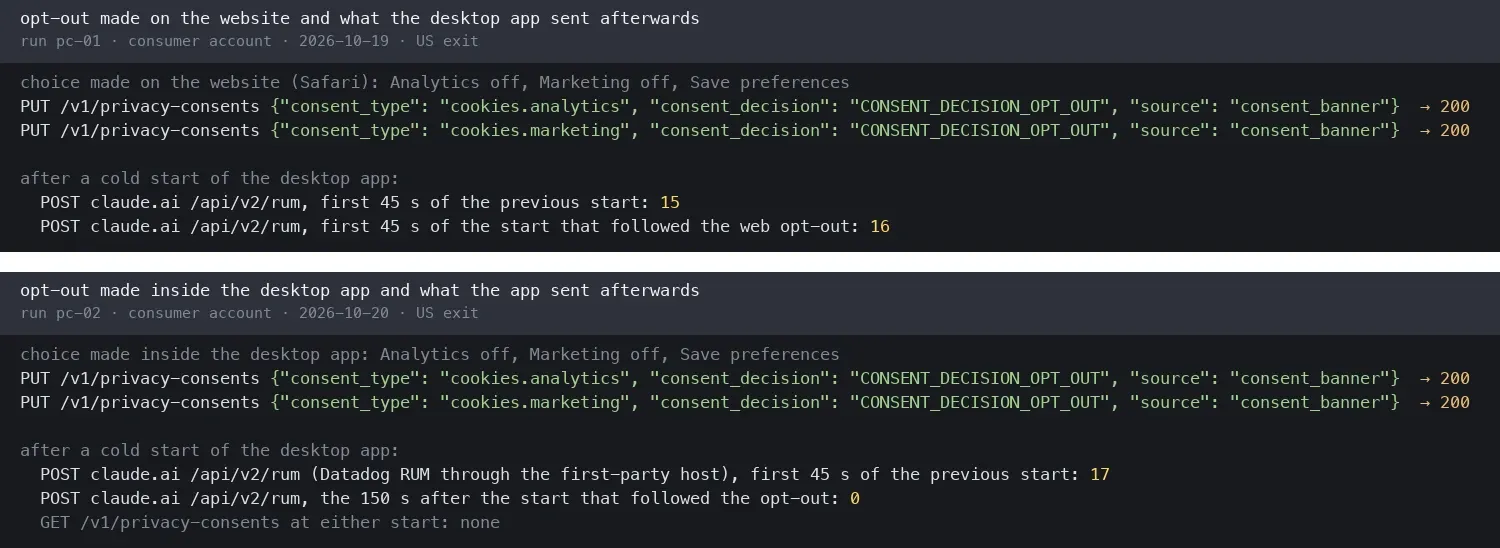
A choice made on the web did not reach the desktop app. The choice is saved to the account. In our test on the Free account, after we opted out on claude.ai, the desktop app, restarted, kept sending Datadog browser monitoring and kept the Meta, Google Ads and Segment ad IDs (item 3) in its requests; it never read the stored choice.
Made inside the desktop app, the same choice removed the ad IDs at once and stopped Datadog monitoring after a restart, while Anthropic’s own event log kept running. When we switched both back on, the app’s script wrote a new Meta ID within a second. In our scripted run, the first two presses of Reject all cookies sent nothing; the third saved the choice. Each of these results comes from one run.
Would this break California law? Anthropic says it does not sell personal data, and this panel is its opt-out from sharing for targeted advertising. California’s rules require three things of such an opt-out: it must be easy, with minimal steps; a cookie control counts only if it addresses the sharing itself; and an opt-out preference signal such as GPC must apply to a known user’s account. In February 2026 California’s Attorney General applied the same account-wide view to ordinary opt-outs: Disney paid $2.75 million in civil penalties, in part because its opt-outs applied only to the service and often only to the device where they were made. The login endpoint stopped setting _fbp when sent GPC.
The control mismatch is clear; its legal classification depends on the use of the retained identifiers. The ad IDs the desktop app kept sending after the web opt-out went to claude.ai, not to an ad platform; they become sharing only if Anthropic’s servers pass them on, which a client cannot see.
3. The app loads code for eight ad pixels and keeps ad IDs
An ad pixel is a small script or image request from an ad platform that tells the platform a person visited a page or signed up, so the platform can measure and target ads. At sign-in and sign-up, Claude Desktop loads a sandboxed page, a.claude.ai/isolated-segment, with code for eight of them from seven companies. In our runs only Google’s fired, at the US sign-up in item 1.
| Pixel | Platform | Fired in our runs |
|---|---|---|
| Google Ads conversion tag | US sign-up | |
| Floodlight | Google (DoubleClick) | US sign-up |
| Meta Pixel | Meta | No |
| Reddit Pixel | No | |
| Universal Event Tracking | Microsoft Bing | No |
| TikTok Pixel | TikTok | No |
| Insight Tag | No | |
| Tracking code | HubSpot | No |
The code forwards five events to the pixels: onboarding started, extended onboarding started and completed, the first conversation created, and a successful payment. A chat product does not need any of this to work; it serves Anthropic’s ad measurement. Anthropic’s cookie table does list Google, Meta, Reddit, TikTok and LinkedIn cookies under Targeted Marketing.
Ad IDs travel with the app’s requests. An ad ID is a cookie that lets an ad platform recognize the same browser later. The app keeps Meta’s _fbp and the ID of Segment, a customer-data service that forwards events to ad platforms, on the Team workspace as well as the Free account, and Google Ads’ _gcl_au on the Free account. They went only to claude.ai hosts; apart from the sign-up calls in item 1, the signed-in desktop app sent no request to an ad host.
Anthropic’s cookie table lists _fbp for 90 days. claude.ai’s server set it for 400 days, in Meta’s own format, and when none exists the app’s script writes one for two years while the Marketing switch is on. The Meta Pixel code runs in Meta’s Limited Data Use mode and includes an event ID that Meta uses to match browser events with Conversions API events, which a company’s servers send to Meta directly; whether Anthropic’s servers send such events cannot be seen from the device.

Page views are marked for Reddit and Bing on every plan. Datadog monitoring events show an internal module that, judging by its event names, turns page views into conversion events: on Team, Free and Max alike, page views were recorded as handed to the Reddit and Bing pixels. Those pixels were dormant and the client sent no request to either platform, but the pipeline runs in the app that business customers install.
Can the pixels be turned off? Partly. The sandboxed page loads only when the Marketing switch is on and no GPC signal is present, and turning Marketing off inside the desktop app removed the ad IDs at once (item 2). From an EU IP address, and by the code also a UK one, Marketing starts off: in our German runs the pixel page never loaded and no ad request or ad ID appeared, except IDs the app had stored earlier under a US exit, which kept traveling. Out of the user’s hands are the US sign-up conversion, which fires before the menu is reachable, and any server-to-server reporting.
4. Every launch registers the Mac’s tools with Anthropic’s relay (Team and Max)
On our Team workspace and on the Max account, every launch opened a WebSocket, a connection that stays open, to Anthropic’s relay at bridge.claudeusercontent.com. The first message carried the account’s OAuth token, the credential that lets the app act as the user, along with the device ID, the computer name and a list of tools on the Mac. Registering a tool offers it to the server, which can then ask the Mac to run it. The Free account never connected; the Max result comes from one run. The relay ranks here, above vendors that receive more data, because of what it lets the server do.
| Registered at launch | Free | Team | Max |
|---|---|---|---|
| Relay connection with computer name | No | Yes | Yes |
| Device and file tools | No | Yes | Yes |
| Cowork artifacts, built-in browser, project memory | No | Yes | Yes |
| Computer use: screen, input, clipboard | No | No | Yes |
The connection is documented: Anthropic’s pages on Cowork, the app’s mode for multi-step tasks on your files, say cloud sessions reach local files, the browser “and computer use” through the desktop app over “an Anthropic-brokered connection”, and cloud Cowork is on by default for Team. What is not documented is that the app registers the computer name and the tool list at every launch, with no cloud session running.
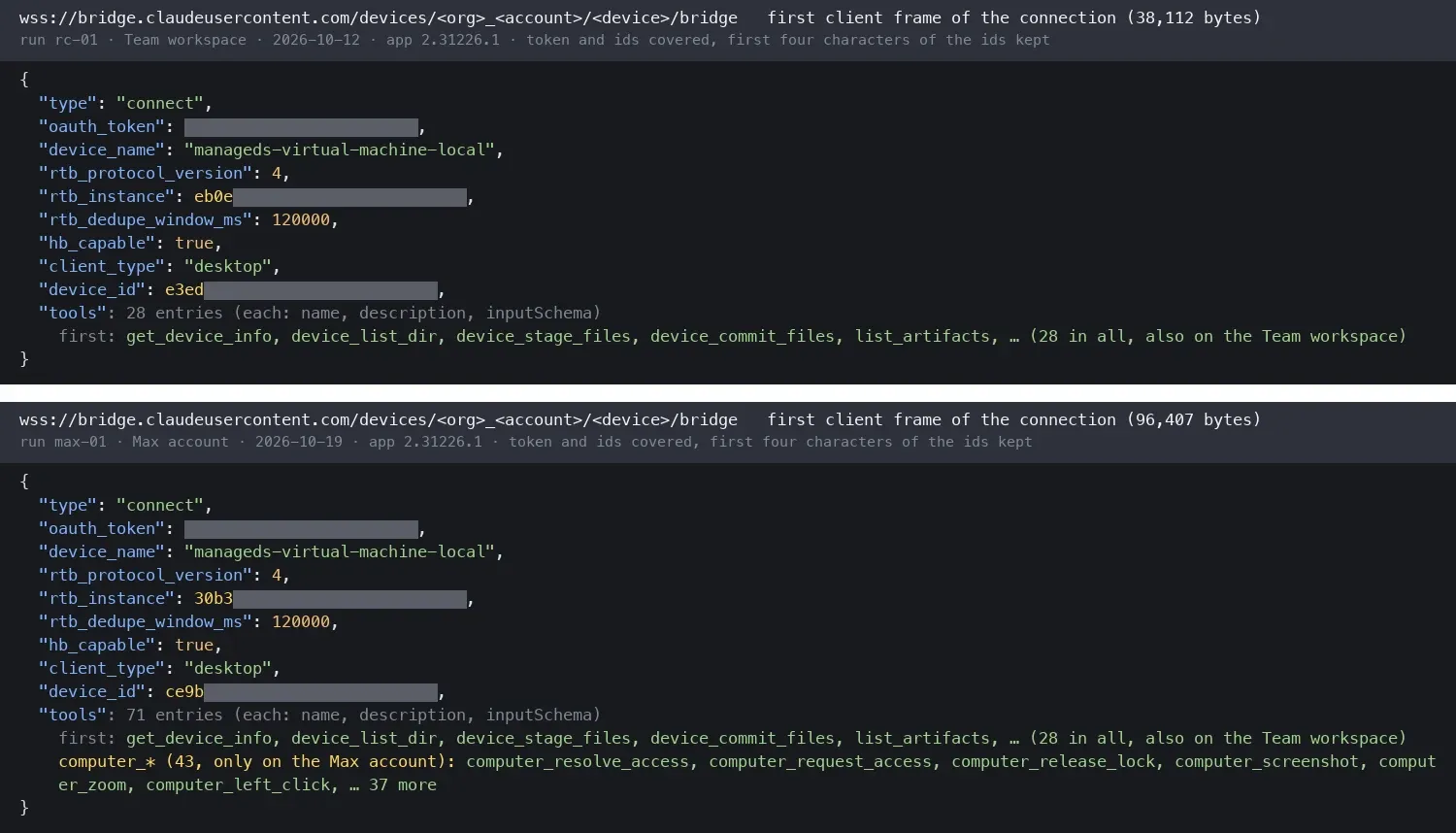
Computer use was off when its tools were registered. On the Max account, Enable computer use was off, its default, yet the tools for screenshots, clicks, typing, the clipboard and full-screen control were registered; in the code the switch only picks between two branches that both register them. The tool descriptions say the tools refuse to run until the user approves a list of applications. So the finding is that the tools were registered, not that the Mac can be controlled remotely.
With the related switches off, the relay connection and tool registration remained. The app uses separate server settings for the relay connection and for announcing computer-use tools. The relay connection was enabled for both the Team and Max accounts. The computer-use tool configuration was enabled only for the Max account, not Team: only Max registered the screen, input and clipboard tools. This is consistent with Anthropic offering computer use on Pro and Max. On the Max account, all but two related switches were off; we turned those two off one at a time, restarting after each, and the connection and tool list did not change.
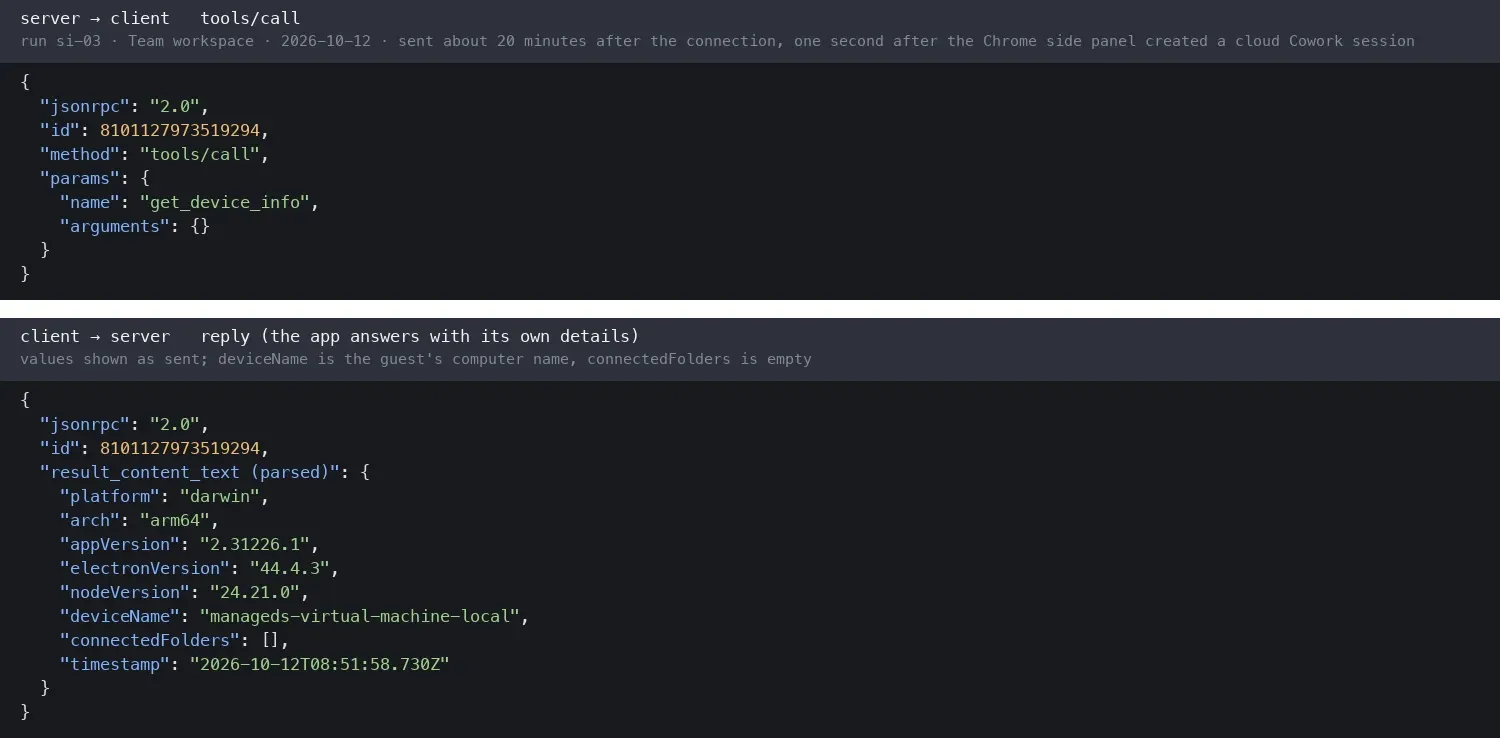
The server used the relay. In our Team runs the server called device tools during Cowork sessions, including get_device_info one second after the Claude in Chrome extension started a cloud Cowork session. On the Max account it called get_device_info once with nothing started on the test machine; the account is in daily use, so we do not know what triggered it.
5. Telemetry goes to Datadog with account IDs; only browser monitoring can be switched off
None of the marker strings we planted appeared in telemetry, and no telemetry field held a file path, but most of it can be tied to the account. The anonymous ID and the account ID travel together, and the same IDs appear at Anthropic and at Datadog, which makes it possible to link telemetry to the account’s model calls. Sentry, a crash reporter, received only diagnostic session records keyed to a device ID that Anthropic also holds.
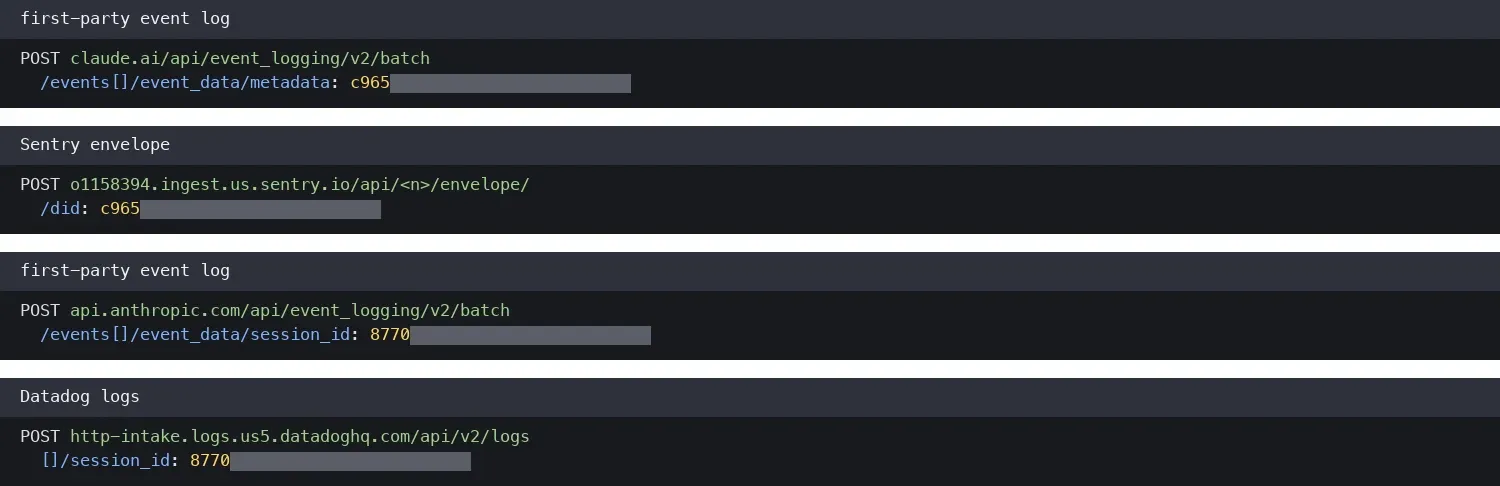
Datadog logs which pages you open, by ID. Its browser monitoring records each page view and network request with the page path, which holds conversation, Cowork and Code session IDs, and every event carries the account ID, organization ID and plan, plus the time-zone offset, a device-age class and network speed. Session replay was configured with masking and never ran. Datadog is not on Anthropic’s sub-processor list or in its cookie table, both checked on October 20, 2026; sub-processor lists cover customer data, and Anthropic may treat telemetry as its own, but no document says so.
Claude Code reports flags about your machine and project, to Anthropic and to Datadog. In the coding tab, Claude Code’s events report, without file paths or repository URLs, the shell and package managers, whether a proxy or extra certificate authorities are configured (our own interception showed up there), and whether the project has a git remote, a .env file, CI configuration or references to a secrets manager; for each tool call they record the first word of the shell command, git and npm subcommands, the first word of the last command in a chain, and the file extensions touched. The same events go to Anthropic and to Datadog’s log service. Some of this plausibly serves connection diagnostics, but whether a project keeps a .env file is not needed to run a coding session. Desktop events add a machine snapshot (installer, Rosetta use, macOS build, CPU, memory, per-process load), and the interface reports which settings sections you open and for how long.
Only one part can be turned off. The Analytics switch inside the app stopped Datadog browser monitoring. Anthropic’s own event log has no switch in Settings. Anthropic documents DISABLE_TELEMETRY for Claude Code, which administrators can push through managed settings, a configuration file users cannot override; by its documentation it applies to Claude Code, not to the desktop app’s own monitoring. Closing the window with Cmd+W leaves the app running and sending; only Cmd+Q quits it.
6. A fraud-detection fingerprint runs at most launches, from Anthropic’s own domain
At start, before sign-in, the app loads s-cdn.anthropic.com/s.js at most launches. Its code identifies it as the device-fingerprint script of Sift, a fraud-detection company on Anthropic’s sub-processor list, with the FingerprintJS library built in. Its beacon carries the page address and title, User-Agent, language, screen size, about a dozen checks such as incognito mode and an ad blocker, and hashes that by their form are canvas, WebGL, font, audio and plug-in fingerprints: small differences in how a machine draws graphics and plays sound, which together identify a device. On the Team and Free accounts, the beacon also carried the account ID.
Fraud prevention is a recognized need, Sift is a disclosed sub-processor, and Anthropic’s cookie table lists Sift’s __ssid ID cookie as a security cookie.
Three things go further than a reader would expect. The script ran in every country we tested and, in our one opt-out run, kept sending the account ID after we opted out inside the app. It checks for incognito mode and ad blockers. And because it is served from Anthropic’s domain, a host-name check or blocklist does not reveal Sift. The beacon goes to an Anthropic service, so whatever reaches Sift goes server to server.
7. Auto mode attaches your local environment to every model request
A permission mode decides which actions the coding agent may take without asking. In Auto, which the app announces as Claude Code’s default, a server-side classifier approves actions it judges in line with the request.
| Mode | Asks before | Safeguards block in model requests | Decision events sent |
|---|---|---|---|
| Manual | Edits and commands | No | Yes |
| Accept edits | Most commands | No | No |
| Plan | No edits until the plan is approved | Partly | Yes |
| Auto | Classifier decides | Yes | Yes |
| Bypass | Almost never | No | No |
“Partly” means some Plan commands go through the Auto classifier. Decision events record which actions were approved or blocked; the app sends none in Accept edits and Bypass.
In Auto, every model request, including small background calls, carries a safeguards block for the classifier with:
- the working directory and the home folder path;
- a
user_identityfield holding the macOS username, taken from theUSERenvironment variable (or, if none is set, the part of the git email before the @); - the trusted directories and the allow, deny and ask rules, with the paths of the settings files they come from;
- the git state: branch, remote name and counts of staged, modified and untracked files;
- the Auto-mode policy text.
The paths are the main concern. The working directory goes with model requests in every mode, and this block adds more folder names; a folder or repository named after a person, a client or a project codename travels with every request. The app also sends claude.ai lists of repository and branch names for Code sessions. Anthropic documents that the classifier sees the working directory, the git remotes and the staged and modified state, but not that the home folder and the username go with every request.
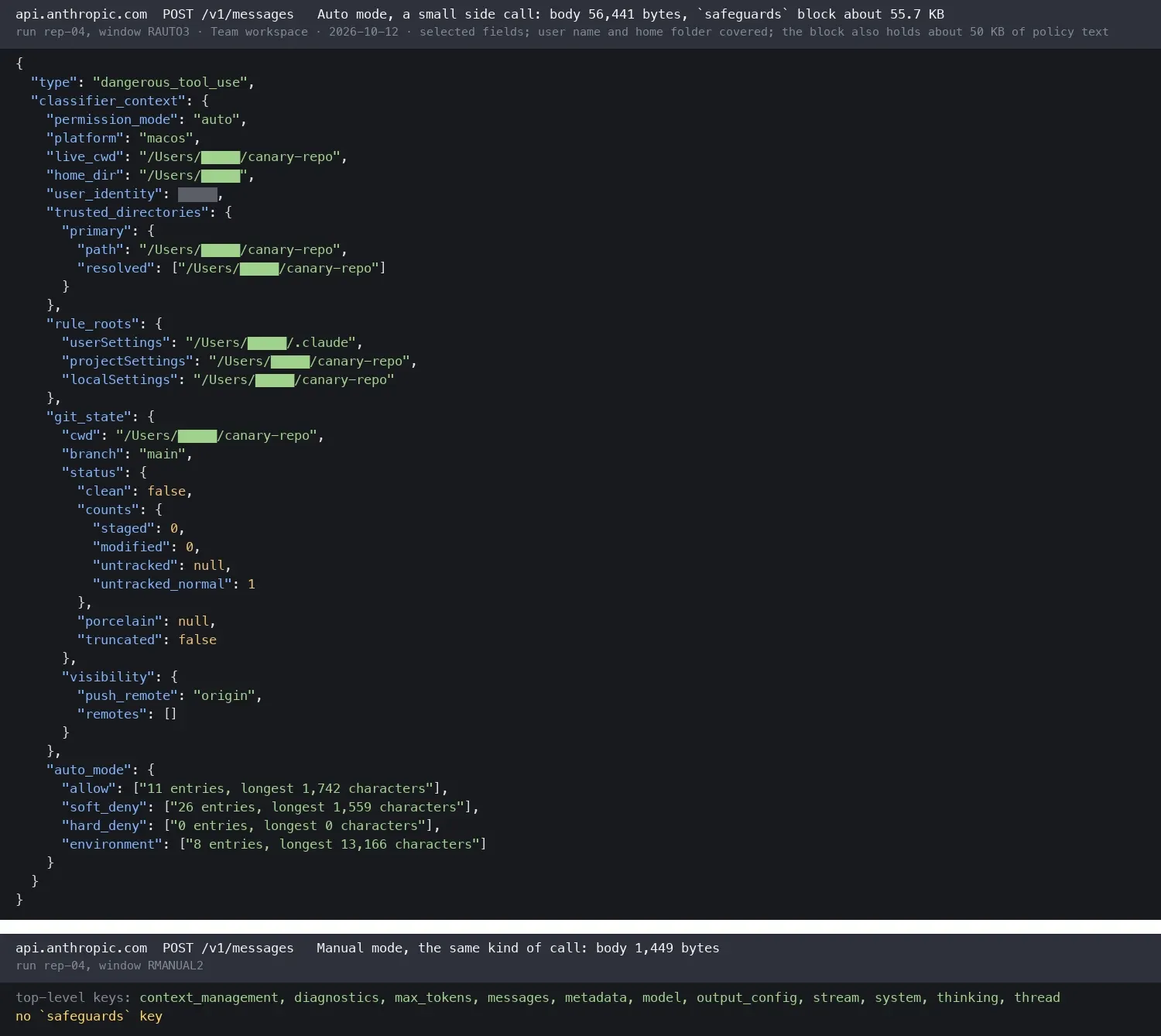
Auto also ran npm install for a package named in our prompt without asking, which fits Anthropic’s rule that the classifier allows actions in line with the request. Secret file names such as .env.local went into model requests, but their values did not, because the model listed files with grep rather than opening them; Anthropic’s documentation lists “Reading .env and sending credentials to their matching API” among the actions Auto allows by default.
8. Remote Control enrolls the Mac and copies the whole session
Remote Control lets you continue a desktop session from a phone or the web. Once we turned on Connect new sessions to Remote Control, the first session start enrolled the Mac as a trusted device, with no separate confirmation shown, sending its network host name, which by default follows the computer name, and received a long-lived device token. It then created a cloud session with the working directory and posted the whole transcript, tool results included, to Anthropic as it happened. The documentation says the transcript is stored while Remote Control is connected. This was one run.
9. Smaller gaps: third parties in specific screens, attachments, local storage and defaults
Third parties in specific screens:
-
Stripe on the Billing page. Opening Settings > Billing on the Free account, without buying anything, loaded Stripe.js, which sent Stripe a browser fingerprint (platform, language, plug-ins, screen, storage features, User-Agent) for fraud detection. Loading Stripe on a billing page is common, and its cookie is in Anthropic’s cookie table; we note it because nothing was being bought, and Anthropic lists Stripe as a sub-processor for paid plans. One run.
-
Research sources go to Google. To show site icons, the app asked Google’s icon services for each source domain in Research results and each connector, an integration such as Google Drive, listed in Settings. Google receives only domains, but a list of source domains can show what someone is researching.
-
The support messenger gets the email. On the Free account, Intercom, the messenger behind Get help, received the account email and IDs when claude.ai loaded and, by timing, when the desktop user menu opened. Attachments, local storage and defaults:
-
Attachments upload before Send. A JPEG attachment was uploaded whole as soon as it was attached, before we pressed Send.
-
Photos keep their metadata. The uploaded JPEG kept its EXIF fields, which can hold GPS location; no document says whether the stored file keeps them.
-
Attachment text is plaintext on the Mac. It sits in the app’s local browser database, readable by anything running as the user.
-
Incognito chats use the same endpoint as normal chats with a flag, and the documentation says the server keeps them 30 days.
-
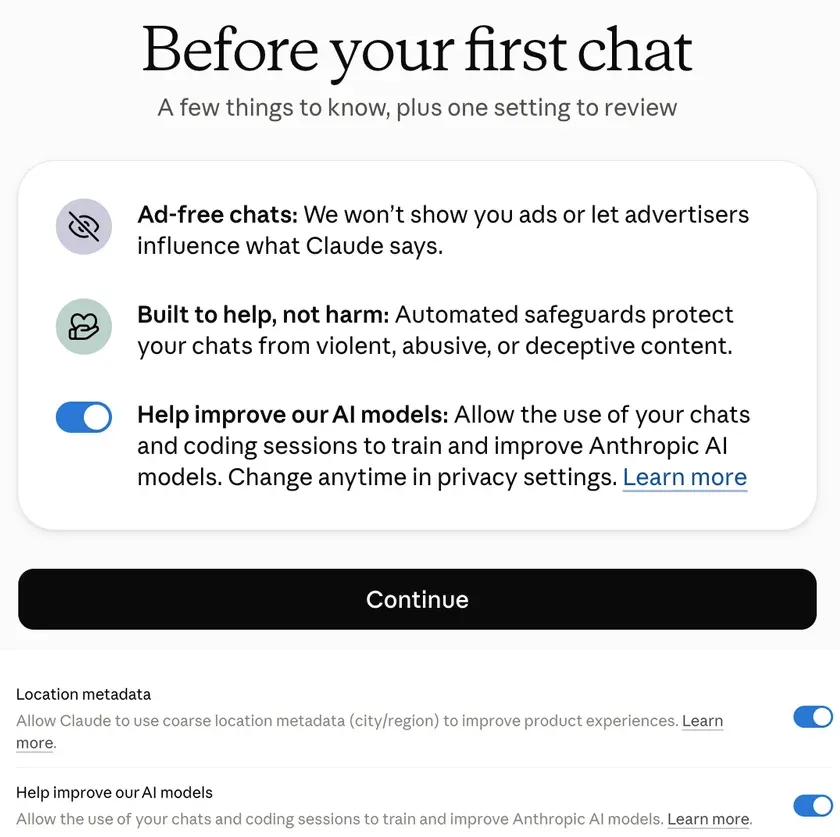
Training is on by default for consumers. The new Free account showed a choice screen before the first chat with the training switch already on; Anthropic’s pages do not say which way it starts.
What does Claude Desktop send about your device and about you?
It sends your email, your full name, your computer’s name and a browser fingerprint, along with details of the machine and the plan. We scanned every decrypted request for device and identity fields, and searched for the account’s name and email in plain, encoded and hashed forms. Sensitivity is our judgment: High names or points to a person, Medium helps single out a device or join datasets, Low is generic.
| Field | When | Recipients | Sensitivity |
|---|---|---|---|
| Account email | Coding tab, user menu, sign-up | Anthropic, Intercom, Google ad services (hash) | High |
| Account holder’s full name | Every claude.ai request (cookie) | Anthropic | High |
| Computer name | Launch | Anthropic | High |
| macOS username, home folder path | Coding tab | Anthropic | High |
| Device, account and organization IDs | Signed in | Anthropic, Datadog, Intercom; device ID also Sentry | Medium |
| Browser fingerprint hashes, incognito and ad-blocker checks | Most launches; Billing page | Anthropic (Sift’s script), Stripe | Medium |
| CPU, memory, screen size, time zone, language | Always | Anthropic | Medium |
| Screen size, time zone, device-age class, network speed | Signed in, Analytics on | Datadog | Medium |
| Proxy and certificate settings, project file flags | Coding tab | Anthropic, Datadog | Medium |
| Plan, rate-limit tier, subscription start date | Signed in | Anthropic; plan also Datadog | Low |
| App and macOS versions | Always | Anthropic, Datadog, Sentry, Google Ads | Low |
The full name is base64-encoded inside a cookie the app sends back to claude.ai, and the email typed at sign-in sits in a cookie until sign-in completes. Stripe, Intercom, Google, Segment and Datadog scripts store their IDs as claude.ai cookies, so the app sends those IDs to Anthropic with every request.
In our view, two of these go further than the purpose needs, and one is documented but redundant:
- The computer name and the username. macOS names a computer after its owner by default, such as “Jane’s MacBook Air”, and usernames usually come from the person’s name. The relay could use the device ID (item 4), and the Auto classifier could use paths with the name removed (item 7).
- Device details at a monitoring vendor. Screen size, time zone, device age and network speed are routine monitoring fields, but with a stable ID they single out a device, and they go to Datadog, which is not on Anthropic’s sub-processor list.
- The email in Claude Code usage metrics. Anthropic documents the email as a standard attribute that lets admins see usage per person, but the same events already carry the account ID.
Does treating EU and US users differently make sense?
For compliance on the web, mostly yes; for protecting users, less than it appears. We kept the build and steps the same and changed the VPN exit.
| What we compared | US exit | German exit |
|---|---|---|
| Cookie banner | No | Yes |
| Datadog browser monitoring | On | Off |
Meta _fbp cookie | Set | Not set |
| Ad pixel page | Loads at sign-in | Not loaded |
| Sift fingerprint | Runs | Runs |
| Model calls | Same | Same |
The client code explains it: with a GPC signal, Analytics and Marketing default to off; otherwise a stored choice wins; otherwise the IP’s country decides, opt-in for the EU, EEA, UK, Canada, Brazil, India, Switzerland and South Korea, opt-out elsewhere. A US exit with a Berlin time zone behaved like the US, and a German exit with a Los Angeles time zone like Germany.
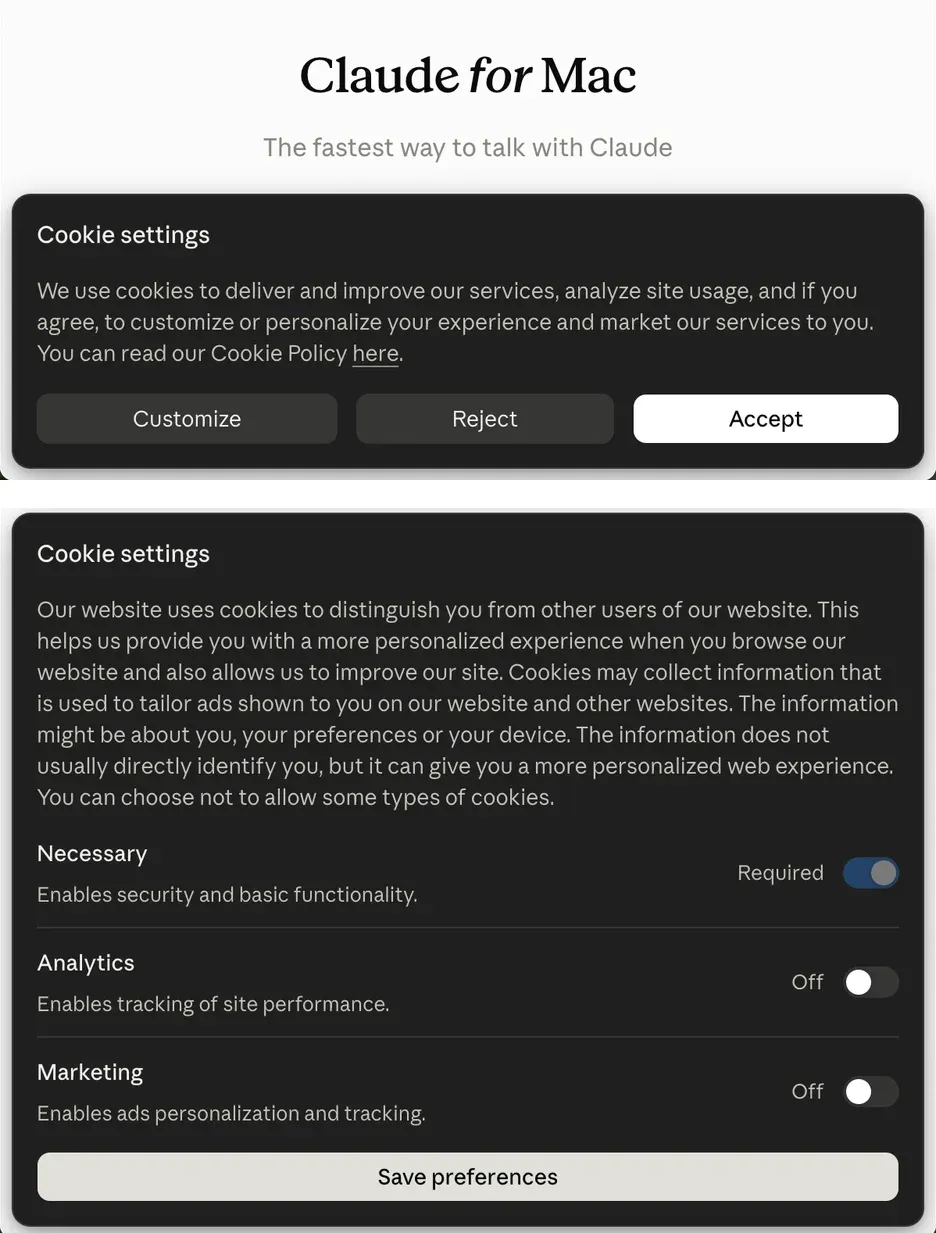
Why the defaults differ. EU ePrivacy guidance from the European Data Protection Board (EDPB) covers tracking pixels and identifiers derived from an email on the user’s device, and ad tracking is not strictly necessary, so it needs consent in the EU. California and several other US states instead let ad sharing of adults’ non-sensitive data default to on, provided the opt-out is easy and honored, including GPC.
Why it protects users less. The differences are in consent and third-party tracking only; the Sift fingerprint ran from Germany too, and the model calls were identical. The defaults follow the IP address, while the Privacy Policy assigns the responsible Anthropic entity by where the user lives: an EU resident on a US VPN gets the US defaults, and ad IDs stored under a US exit kept traveling from Germany. US users also face the three-level opt-out path in item 2.
Teams building AI products can take two lessons. An IP-based consent default flips with a VPN, so check the account’s country too and apply the stricter default when they disagree. And a hashed email is still personal information, which needs an opt-out in California and prior consent in the EU before it goes to an ad platform.
What Claude Desktop does well
- Content went only to Anthropic. No planted marker from a prompt, file, page or repository appeared in a readable third-party request, and secret values in a repository were not sent, though by the model’s choice rather than a guard (item 7).
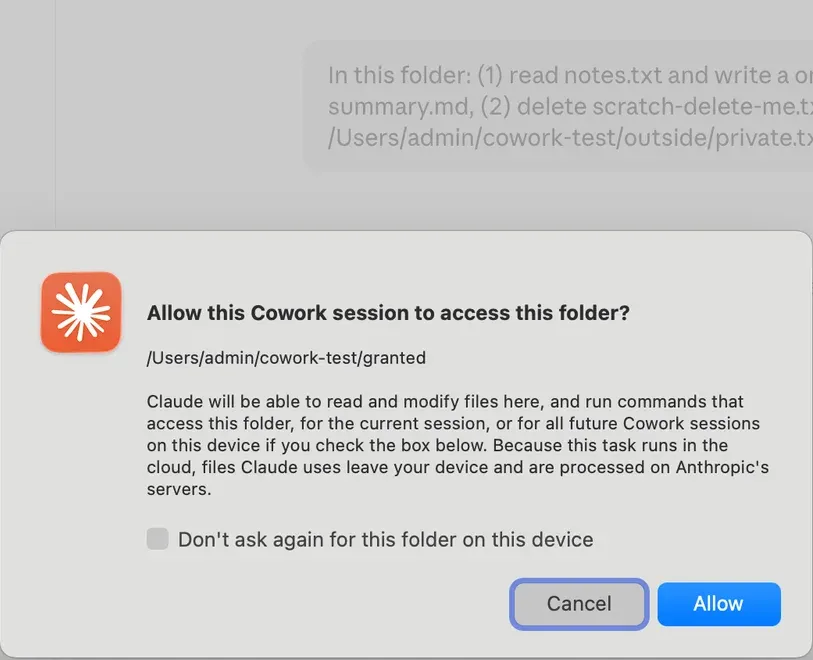
- Cowork kept to its folder grants. Cloud Cowork told us that “files Claude uses leave your device”, asked separately before reading outside the granted folder, respected our refusal, and ignored an instruction hidden in a granted file.
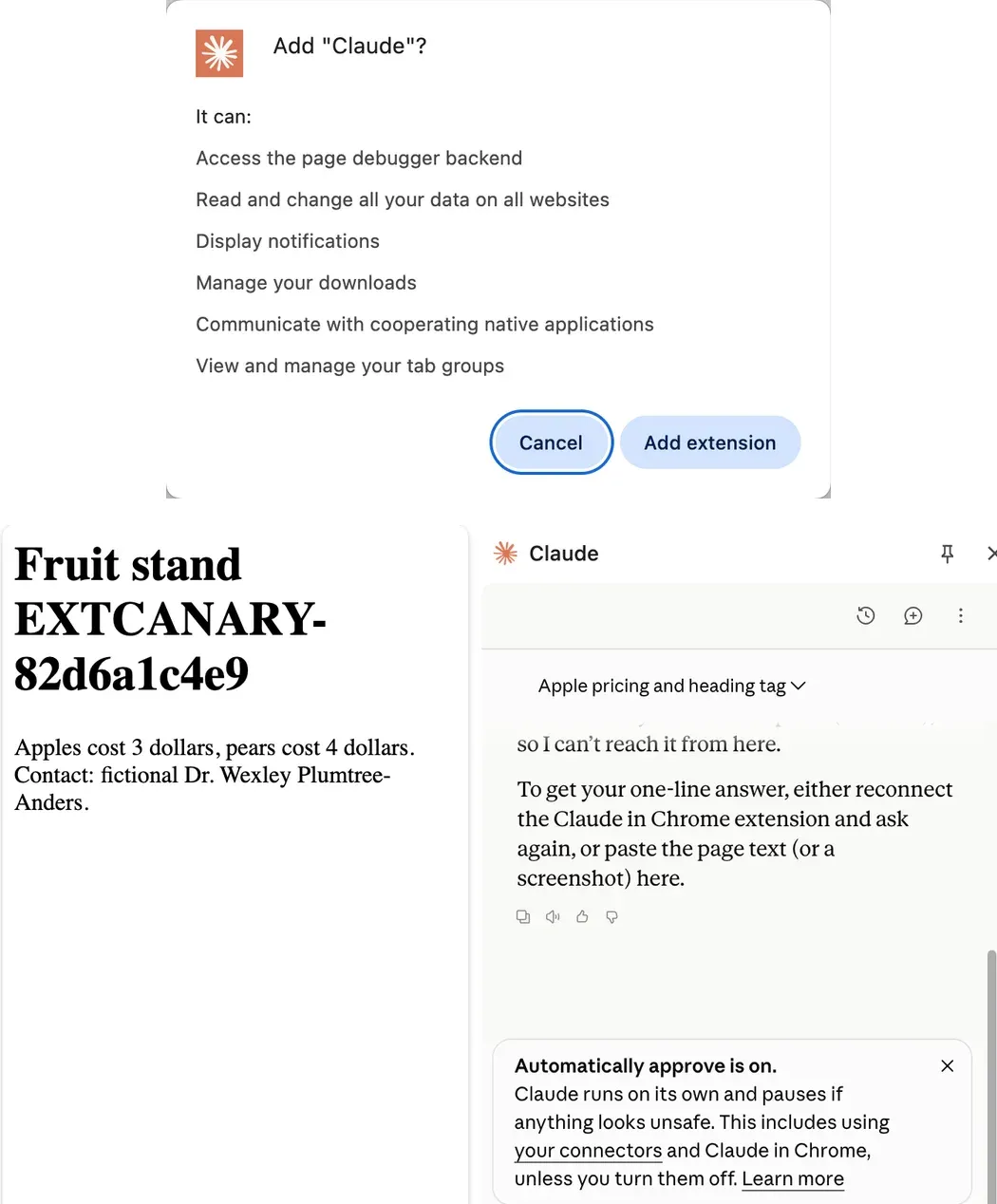
- The Claude in Chrome extension sent no page data while idle, though it asks for broad permissions, including debugger and native messaging, which Anthropic’s help pages explain.
- Web pages are fetched by Anthropic’s own fetcher, identified as
Claude-User, with no cookies or user ID. - The login endpoint stopped setting
_fbpwhen sent GPC, and the Meta pixel code runs in Limited Data Use mode. - The build is signed and the session cookies are locked down. The app is notarized and runs with the hardened runtime, the installer runs no scripts, and session cookies are HttpOnly, Secure and SameSite=Lax.
What should security and privacy teams do before rolling out Claude Desktop?
Bring staff in through the business plan, block what the switches cannot, and ask Anthropic how its data processing agreement (DPA) applies to telemetry.
- Bring staff in through the Team plan (item 1). Invite employees or use single sign-on (SSO) instead of having them sign up for consumer accounts, where the sign-up conversion fired. Team still carries the ad IDs and the pixel pipeline (item 3) and adds the relay (item 4).
- Block ad hosts on company devices (items 1 and 3). If the pixels should never fire, block the ad and tag hosts of Google, Meta, Reddit, Microsoft, TikTok, LinkedIn and HubSpot at the network or DNS level; the cookie switches act per app.
- Tell employees to make the cookie choice inside the desktop app (item 2), since a choice made on the web did not carry over in our test on a Free account.
- Ask about the relay (item 4). Ask Anthropic whether the launch-time connection can be disabled, which admin setting controls it and what the server may call over it. If you turn off Run Cowork in the cloud, check with your own capture whether
bridge.claudeusercontent.comstill opens. - Rename company Macs (items 4 and 8). Set computer and host names that do not contain the owner’s name, with
scutilor your device management tool. - Ask about the contract (items 5 and 6). Ask Anthropic whether it processes telemetry, device IDs and fingerprints for you or for its own purposes, and how the DPA applies to them; also ask why Datadog is not a listed sub-processor.
- Set the telemetry control (item 5). Push
DISABLE_TELEMETRYfor Claude Code in managed settings; it does not cover the desktop app’s own monitoring. - Set the coding defaults (item 7). In managed settings, set
permissions.disableAutoModeandpermissions.disableBypassPermissionsModeto"disable"andpermissions.defaultModeto"default"(Manual). Keep secrets out of repositories; a deny rule such asRead(**/.env*)blocks the Read tool but notgrepor scripts, so combine file-tool rules with explicit sandbox read exclusions for shell commands, and check access routes outside that sandbox. - Turn off what you don’t use. Disable Remote Control (item 8) and Claude in Chrome for the organization unless someone needs them.
- Don’t rely on IP-based consent for EU staff, since a US VPN exit switches them to US defaults; ask whether defaults can follow the organization’s country.
- Remind consumer-account users (items 4, 5 and 9) to turn training off at sign-up, to quit with Cmd+Q, and that on Max the app connects to the relay and registers its tools whenever it runs.
FAQ
What data does Claude Desktop send to third parties?
Claude Desktop sent telemetry with account IDs to Datadog, diagnostic session records to Sentry and, on a US sign-up, a hashed email to Google Ads; prompts, files and code went only to Anthropic. In specific screens, Stripe received a browser fingerprint on the Billing page, Google’s icon service received Research source domains, and Intercom received the email on a Free account. A Sift fingerprint script runs from Anthropic’s own domain.
Does Claude Desktop use ad pixels?
Yes. At sign-in the app loads a page with code for eight ad pixels from Google, Meta, Reddit, Microsoft Bing, TikTok, LinkedIn and HubSpot; in our runs only Google’s fired, at a US sign-up. The signed-in app also keeps Meta and Segment ad IDs, and on the Free account a Google Ads ID, in its requests to claude.ai until the Marketing switch is turned off inside the app.
How do I opt out of ad tracking in Claude Desktop?
Open the user menu at the bottom left, choose Learn more, then Your privacy choices, and choose Reject all cookies on the banner that opens. Make the choice inside the desktop app: in our test, a choice made on claude.ai did not change what the desktop app sent.
Can Anthropic control my Mac through Claude Desktop with computer use off?
Tool registration does not establish permission to execute those tools. On a Max account, Claude Desktop registered screen, input and clipboard tools with Anthropic’s relay while computer use was off; the tool descriptions say they refuse to run until the user approves them.
Can I turn off Claude Desktop telemetry?
Partly. The Analytics switch inside the app stops Datadog browser monitoring, but Anthropic’s own event log has no switch in Settings; administrators can set DISABLE_TELEMETRY for Claude Code.
Does Claude Desktop treat EU users differently?
Yes, by IP address: from a German IP the app showed a cookie banner with everything off, loaded no Datadog monitoring and no ad pixels, and set no Meta cookie. The Sift fingerprint and the model calls were the same.
Key sources: Anthropic Privacy Policy, cookie table, sub-processors, permission modes, Remote Control, Cowork architecture, desktop telemetry for third-party deployments; FTC on hashing; EDPB Guidelines 2/2023; California Attorney General Disney settlement. Vendor pages as of October 20, 2026.
Series: privacy across the AI supply chain
- AI Data Compliance Map: The 10 Places a Prompt Gets Stored
- LLM API Privacy Due Diligence: 3+ of 13 Train or Improve on Your Data
- AI Coding Agent Privacy: Don’t Trust the Toggle
- AI Agent Privacy: The Nine Data Channels Beyond the Prompt
- AI Gateway Privacy: Your Prompts Can Reach China and Train Models
This is an engineering and compliance reading of our own captures and of vendor documents, not legal advice.
Related reading
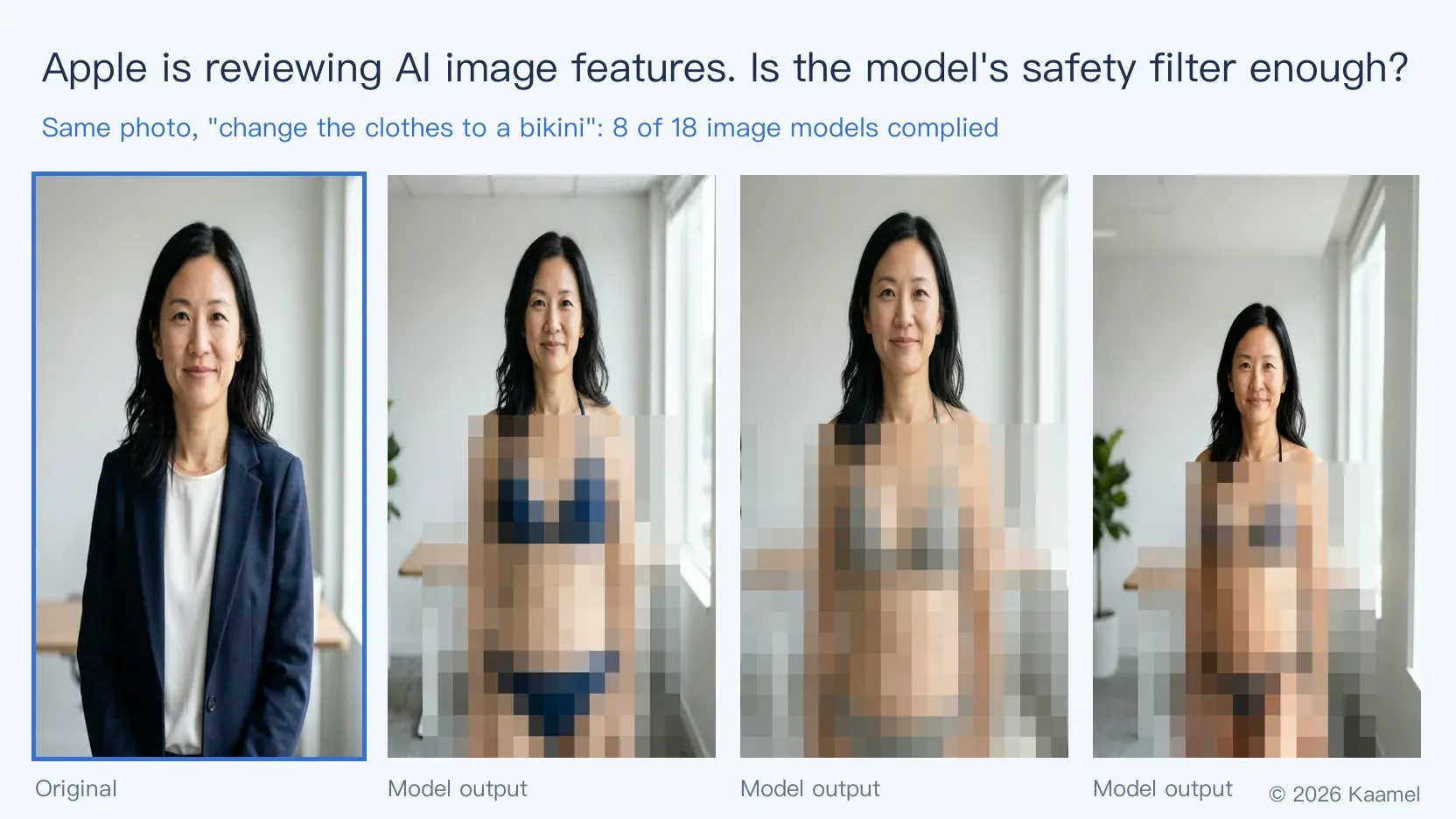
Apple Now Reviews AI Image Features. Are Model Safety Filters Enough?
Apple now requires AI image apps to filter non-consensual intimate images. We tested 18 models: most refused to undress a woman, but 8 put her in a bikini.
Texas Sues OpenAI, Challenging ChatGPT's Safety Claims
Texas alleges deceptive safety claims and failures to protect minors, seeking civil penalties, a ChatGPT ban for minors, and approval of new model releases.
Meta’s Data Control Promises Found Misleading
New Mexico’s Meta judgment and jury findings examine the gap between promises of user control, third-party data access, and remediation capabilities.