AI Agent Privacy: The Nine Data Channels Beyond the Prompt
 Kaamel Lab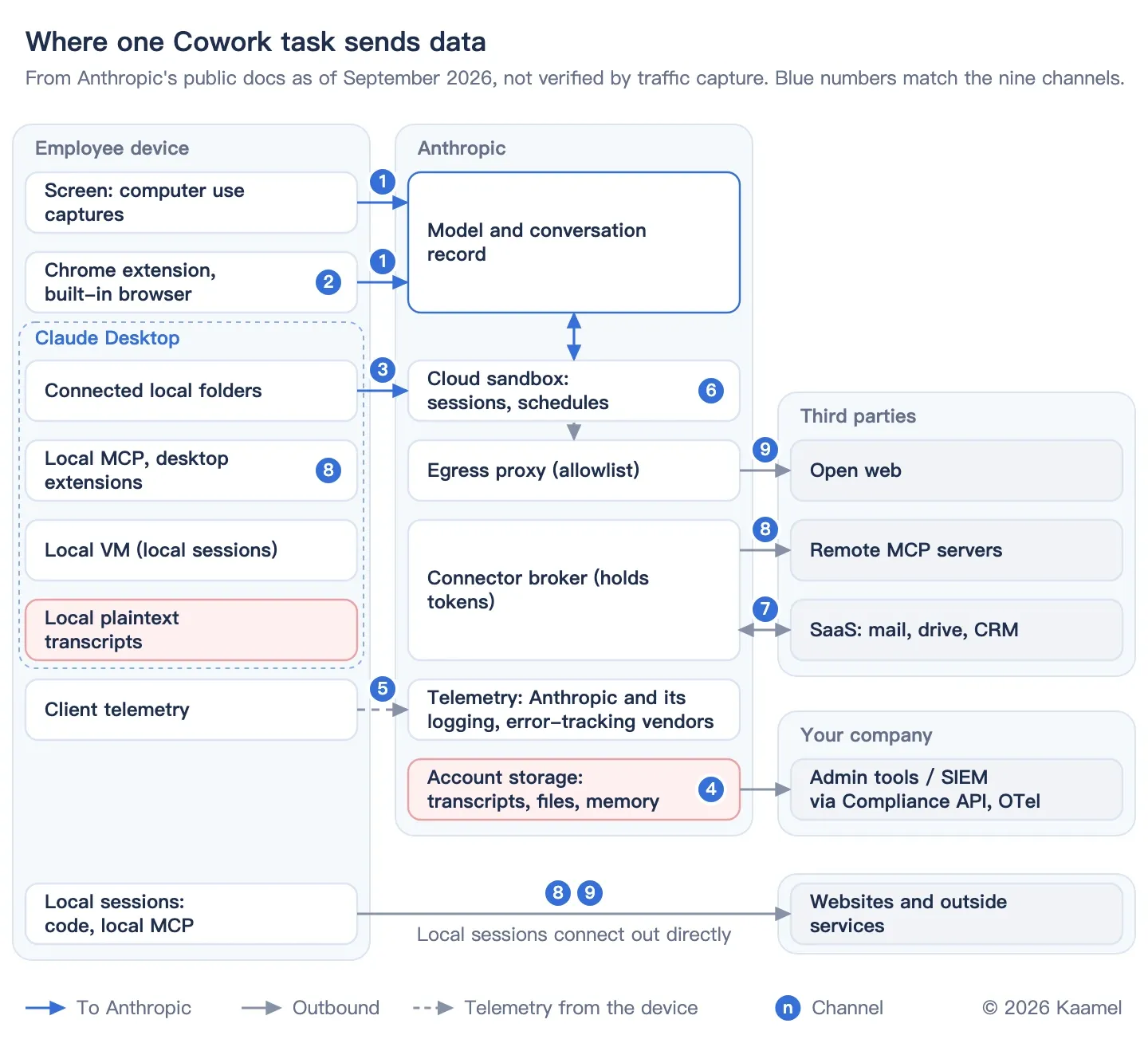
One ordinary agent task opens nine data channels beyond the prompt. Picture a customer success manager preparing quarterly reviews for 20 key accounts in Cowork, with Claude in Chrome installed. The agent exports usage from the admin console, pulls email through the Gmail connector, reads a local renewals sheet and drives the CRM desktop client with computer use, which lets the model operate the computer. The manager also connects a third-party CRM server over the Model Context Protocol (MCP, the standard way agents call outside tools), adds a slide-building skill, asks Cowork to remember the report format and schedules the task for Mondays.
Computer use needs a Pro or Max plan, so this runs on a personal Max account under consumer terms with no data processing agreement (DPA), which is the shadow-AI case in Part 3. Defaults below are for personal plans unless marked Enterprise. Each piece of data takes its own path and retention clock, and most privacy policies clearly describe only the prompt.
Government security agencies have noticed. In May 2026, CISA, the Australian Cyber Security Centre and partner agencies published Careful Adoption of Agentic AI Services, which warns that pooling prompts, organizational data and tool credentials “makes agentic AI systems an attractive target for malicious actors.”
Key takeaways
- Claude Cowork shows what one agent task exposes: nine data channels beyond the prompt, from screenshots and sign-ins to memory, MCP tools and scheduled runs. With Enterprise’s Compliance API (Anthropic’s audit export) on, Cowork transcripts, local ones included, are kept six years by default and cannot be deleted through the API.
- Browser agents act with your identity. Of 11 general-purpose agents and agent browsers we compared, 8 can use the sign-ins already in your browser, and 10 send screenshots or page content to the vendor.
- Personal-plan terms follow employees to work. Eight of the 11 use personal-plan data for training by default (Gemini Spark cannot be used with training off). Gemini Spark, Opera Neon, Dola and Kimi have no business tier.
- Enterprise agents can reach more than the user. Across the 12 enterprise agent platforms we compared, 7 let agents run under an identity other than the invoking user’s, and 7 call another company’s models or services by default.
- Model vendors’ DPAs stop at the MCP server. Anthropic, OpenAI and Microsoft leave third-party MCP servers outside their DPAs because the customer chooses them, and OpenAI’s EU data residency ends once data reaches an MCP server.
This is the fourth article in our series on privacy across the AI supply chain, after the third on coding agents. It covers general-purpose agents, agent browsers and enterprise agent platforms: data flows and defaults, not prompt injection, as documented on September 22, 2026.
How we did this. This analysis rests on vendors’ public docs, privacy policies, app store privacy labels and press reports, not traffic capture. Docs and actual traffic can differ, as the third article showed, so we plan to test these flows separately.
Part 1: Which data channels does one Cowork task open?
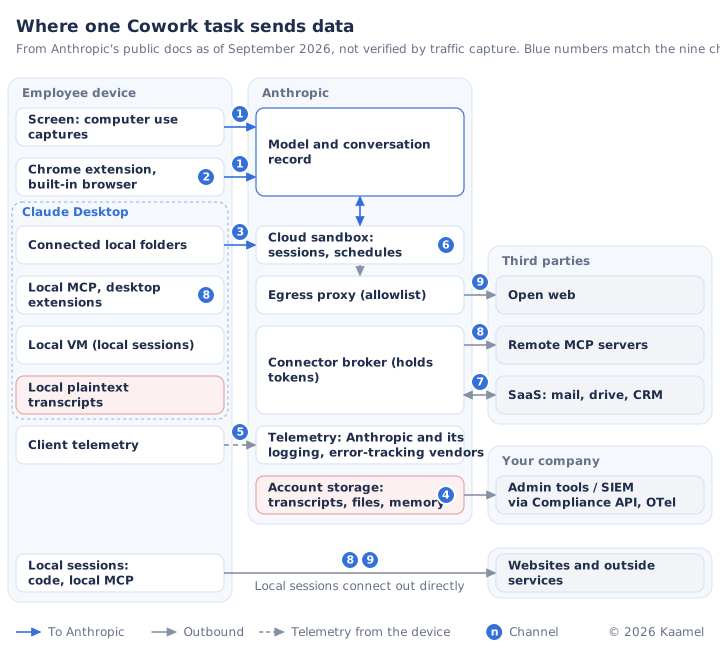
Three channels start on the employee’s device, three keep data or keep running after the task, and three connect to outside services. Anthropic documents Cowork in more detail than other vendors document their agents, so it serves as a map for checking the products in Part 2.
Local or cloud? Both, and several channels depend on which. Cloud sessions (still beta) process files and code on Anthropic’s servers; they are the default on Pro, Max and Team, and Enterprise owners must enable them. Local sessions run code in an isolated VM on the device, and some of their traffic leaves the device directly.
| Channel | Data collected | Goes to | Retention |
|---|---|---|---|
| 1 Screenshots and page content | Anything visible on screen or in a tab, including pages behind a login and other people’s data | Anthropic | With chat |
| 2 Sign-ins | Sessions and cookies for signed-in sites | Stays on device | Persists |
| 3 Local files | Documents and sheets in connected folders | Anthropic | With chat |
| 4 Memory | Role, projects and work context Claude saves about you | Anthropic | Survives deletion |
| 5 Telemetry and feedback | Device, usage, IP location, logs and crash reports; the whole chat on feedback | Anthropic and its vendors | Feedback up to 5 years |
| 6 Scheduled runs | Any of the above, with nobody watching | Anthropic | With chat |
| 7 Connected accounts | Email, calendar, cloud drive files, CRM records | Anthropic and the SaaS app | With chat |
| 8 Tools and MCP | Context the model writes into arguments; tool results | Third parties | Their terms |
| 9 Data given to websites | Form inputs, search terms, your personal information | Third parties | Their terms |
With chat means data is kept as long as the conversation. On personal plans, deleted chats leave the backend within 30 days, or are kept up to five years de-identified if the model-improvement setting is on.
Which three channels start on the employee’s device?
1. Screenshots and page content. Computer use takes screenshots of your screen and the apps you allow. Anthropic says Claude “can see any information visible on your screen or those apps, including personal data, sensitive documents, or private information belonging to you or others.” A Slack preview about another customer can end up in a screenshot. In Chrome, Claude sees pages behind a login, and its screenshots become “part of the conversation.”
2. Sign-ins. Claude in Chrome uses the sign-ins already in your own browser, and the traffic comes from your device. Sites you sign in to in the Cowork built-in browser stay signed in for later sessions on that computer.
3. Local files. A cloud session reads connected folders through Claude Desktop, and the renewals sheet is “processed on Anthropic’s servers rather than staying on the device.” Endpoint detection and response (EDR) tools cannot see inside the local VM or into cloud sessions.
Which three channels keep data or keep running after the task?
4. Memory. Cloud Cowork sessions share memory with chat; local sessions don’t use memory. “When a conversation expires or is deleted, related memory entries aren’t removed,” though members can delete individual memories. Memory is on by default on Pro and Max and off on Team and Enterprise.
5. Telemetry and feedback. Claude Code’s data usage page says usage metrics go “to Anthropic and to third-party logging infrastructure” and error reports “to a third-party error tracking service.” For Claude Desktop on third-party clouds these are Sentry and Datadog, and crash reports exclude prompt and response content. The privacy policy adds device and usage data, including time zone and IP-derived location, and after an error “any communications or content provided at the time the error occurred.” Giving a thumbs up or down stores the whole chat for up to five years. The third article found that older Claude Code versions behind third-party proxies also flagged in the system prompt whether the time zone was Shanghai or Urumqi.
6. Scheduled runs. Scheduled tasks run in the cloud “even when your computer is asleep or the Claude Desktop app is closed,” with access to connectors and skills. A task that needs local files runs only locally, so the Monday run that reads the renewals sheet needs the computer on.
Which three channels connect to outside services?
7. Connected accounts. Connector calls to Gmail, the cloud drive and the CRM are made server-side: “in Cowork, connectors reach external services through Anthropic’s cloud, not through your local network,” local sessions included.
8. Tools, plugins and MCP. Covered in the next section.
9. Data given to websites. The agent acts as you, so form inputs and personal information go to the sites under their policies. Cloud sessions reach the web through an egress proxy that only allows listed sites, but that setting does not cover web fetch, web search, MCP servers or Claude in Chrome. In local sessions, code in the VM and local MCP servers connect out from the device, and Anthropic’s docs disagree on where web fetch runs.
Where do MCP servers and skills take data?
Each MCP server is a new data recipient that the model vendor’s DPA does not reach. (A custom connector is a remote MCP server added by URL; a skill is a folder of instructions and scripts the agent can run; a plugin packages skills and MCP servers.)
- The model writes the arguments. Under the MCP specification, a tool call sends a name and arguments that the model fills from the conversation. The spec’s overview notes that “MCP itself cannot enforce these security principles at the protocol level.”
- Remote and local MCP traffic leaves from different places. Custom connectors connect “from Anthropic’s servers, not from your machine’s network interface,” so the company’s egress controls never see that traffic. Plugin-bundled local MCP servers run on the device with the user’s privileges.
- Skills can run code, and scanning has gaps. Skill and plugin scanning is Enterprise-only and off by default until October 2, 2026, when it turns on for organizations that haven’t changed the setting. It is unavailable under zero data retention (ZDR), customer-managed keys or HIPAA settings, and does not cover MCP servers.
- Other vendors draw the same line. OpenAI’s API guide says EU data residency ends once data is sent to an MCP server, and Microsoft says you are “responsible for the tools and resources you access.”
What can admins see and delete?
- The Compliance API keeps local transcripts on Anthropic’s servers too. Per the Compliance API docs, “capture of local sessions is tied to the Compliance API being enabled.” Transcripts are kept six years by default. An org’s finite retention period applies to local ones, and users can delete cloud ones. Transcripts omit screenshots, thinking blocks and MCP configuration.
- Admins can read them but not delete them through the API. “The session endpoints are read-only.”
- A plaintext copy stays on the device. Local transcripts are plaintext files on the device, including anything a tool read, such as
.envsecrets. Admins “cannot centrally manage or delete” local Cowork history, and Claude Code keeps Desktop and Cowork transcripts indefinitely unless a managedcleanupPeriodDaysordesktopSessionCleanupPeriodDayssetting sets a limit.
Part 2: How do vendor defaults and risks differ?
Other vendors’ agents open the same nine channels, with less documentation and very different defaults.
How do general-purpose agents and agent browsers differ?
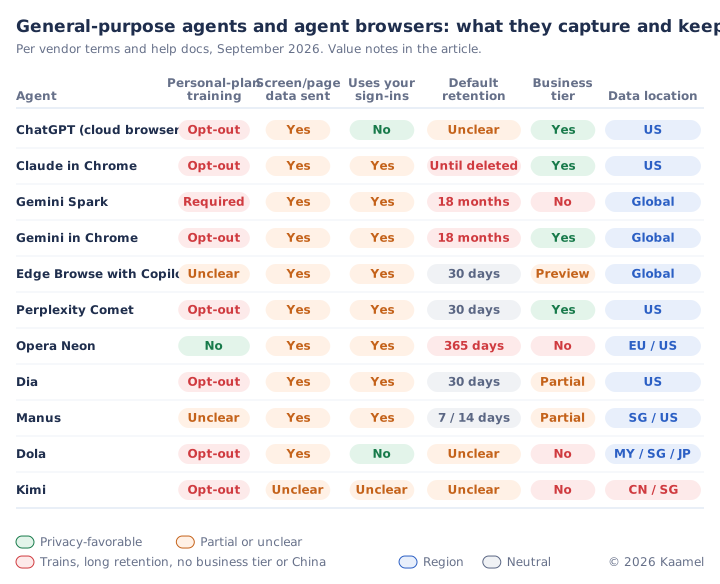
Opt-out means the vendor trains by default and users can switch it off; Required means training can’t be switched off. Until deleted means screenshots stay with the chat until deleted. In the business tier column, Partial means a team plan without a public DPA and Preview a business tier in preview. Global means no region commitment.
- Retention differs. ChatGPT agent, since retired for ChatGPT Work and its cloud browser, purged screenshots within 90 days of chat deletion; Edge’s Browse with Copilot keeps them up to 30 days, and Opera Neon keeps inputs and outputs for 365 days.
- Training switches sit in different places. Gemini Spark requires Keep Activity, which feeds model training and human review, and reviewed chats are kept for up to three years. ChatGPT, Claude and Comet train on personal-plan data unless switched off.
- Some agents act without you. Google warns that if a Spark schedule runs while you are offline, “you may not be able to stop Gemini from completing an unintended action.”
Four products have China ties. Kimi’s kimi.com policy, issued by Beijing-based Moonshot AI, says data is stored in China, while the international kimi.ai is run from Singapore. ByteDance’s Dola says in the Brazil section of its privacy policy that it shares personal data “globally within our Corporate Group.” In April 2026, Chinese regulators blocked Meta’s purchase of Manus, whose parent was founded in Beijing. Opera is majority-owned by Kunlun Tech, though we found no evidence that Neon processes data in China.
How far does a Claude Enterprise contract reach?
A Claude Enterprise contract leaves several gaps. Neither Cowork nor Claude in Chrome supports ZDR, and Cowork is not yet covered by Anthropic’s HIPAA business associate agreement. Claude in Chrome and Cowork’s built-in browser are on by default as of September 10, 2026, unless an admin had turned them off. US-only inference covers where inference runs, not connectors or storage.
Whose permissions do enterprise agent platforms use, and where does data go?
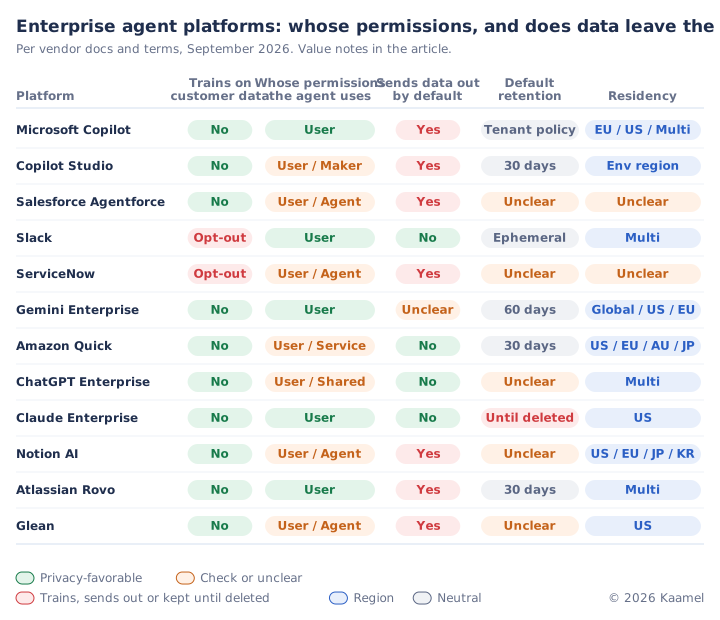
User means only the invoking user’s permissions; Agent adds the agent’s own user record, Maker the builder’s credentials, Service a service account and Shared a shared connection. “Sends data out by default” counts other companies’ model services, search or overflow clouds, even as subprocessors or under ZDR. Gemini Enterprise is Unclear because its default web grounding varies by region, and Google Search grounding sits outside its data residency controls. Until deleted applies unless admins set a period, and Unclear retention means no published default. Ephemeral means Slack stores no summaries or search answers, and its Opt-out covers only non-generative models. Residency is where stored data lives; Multi means several regions to choose from.
Default routing is often missed. Microsoft Copilot turns on Anthropic models by default for most commercial tenants outside the EU, EFTA and UK, with Anthropic as a Microsoft subprocessor under Microsoft’s DPA. Tenants inside the EU, EFTA and UK created after March 25, 2026 also get Anthropic models by default in Word, Excel and PowerPoint, processed outside the EU Data Boundary. Copilot’s web queries go to Bing, where Microsoft is an independent controller outside the DPA. ServiceNow routes requests to Microsoft Azure at peak times, and Atlassian Rovo calls OpenAI, Anthropic and Google models.
Identity decides what an agent can see. CISA recommends building each agent as “a distinct principal,” so a separate identity is not the problem; one that reaches more than the invoking user is. Copilot Studio makers can attach their own credentials, Salesforce gives service agents their own user record, Notion custom agents have independent permissions, and Amazon Quick workflows use service credentials.
Training defaults also differ. ServiceNow shares customer data with its AI and data products unless each instance opts out, Slack’s non-generative models train on customer data unless an owner opts out, and Salesforce’s terms allow anonymized, aggregated use of customer data.
Which incidents have already happened?
- Asana MCP: a logic flaw may have exposed about 1,000 customers’ data across tenants for over a month, according to BleepingComputer.
- postmark-mcp: from version 1.0.16, a fake Postmark MCP package copied every email it sent to an attacker-controlled address, according to Koi.
- Salesloft Drift: attackers used the AI chat agent’s Salesforce OAuth tokens to export customer data from potentially more than 700 organizations, according to The Hacker News.
Part 3: What should companies control when employees use agents?
Cowork, Claude in Chrome and Copilot are productivity tools, not systems of record, yet they reach CRM records, email and files, so the first question is what each agent can reach and do. Guidance from security agencies (CISA and partners, the UK NCSC, France’s ANSSI), data protection authorities (the UK ICO, France’s CNIL, the Dutch AP, Hamburg’s commissioner) and vendor admin docs converges on the controls below. None of the security agencies mentions ZDR. CISA goes furthest: “organizations should only use agentic AI for low-risk and non-sensitive tasks.”
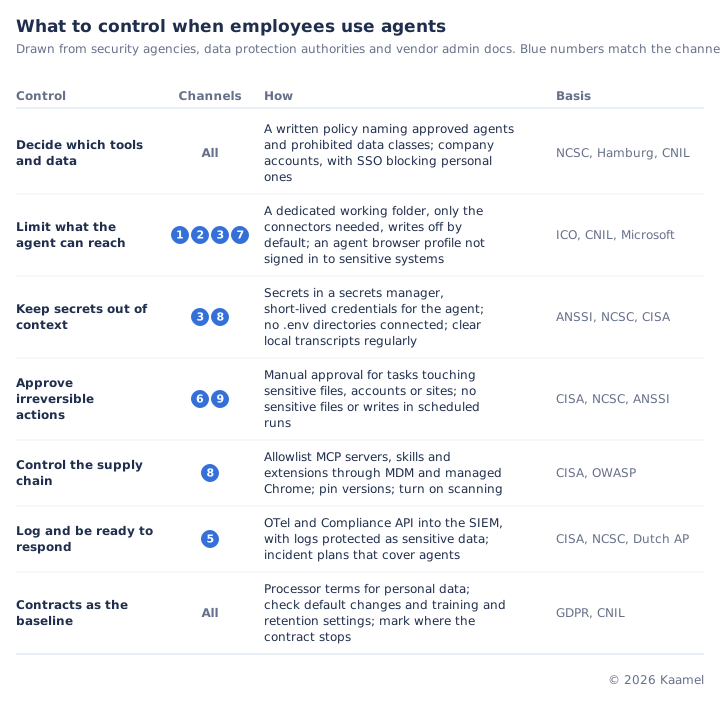
- Decide which tools and data are allowed, and give staff company accounts. The UK NCSC expects shadow AI to persist and says the goal “should be to reduce risk.” Company accounts still need data rules: in Harmonic Security’s 2025 data, personal free-tier accounts carried only 16.9% of sensitive exposures.
- Limit what the agent can reach. The ICO says organizations “should not give agentic AI systems access to information just because it might be useful in the future.” This is the most direct control for personal data, which agents pull in through connectors, folders and screenshots, and for source code, which Netskope found accounts for nearly half of generative AI data policy violations.
- Keep secrets out of the agent’s context. ANSSI says passwords and API keys should never go into public generative AI services, and CISA recommends short-lived credentials. GitGuardian found 24,008 secrets in MCP configuration files on public GitHub.
- Require a human for irreversible actions. The NCSC says to decide when an agent “should stop and seek human approval.” We also recommend keeping sensitive files and writes out of scheduled runs, such as the Monday run in our example.
- Control the supply chain. MCP servers, skills and browser extensions run with the user’s privileges. Besides postmark-mcp, researchers found 341 malicious skills on ClawHub, and in the BragJack demonstration one extension hijacked the AI agents in five browsers and extensions, including Claude in Chrome. Allowlist MCP servers, skills and extensions, and pin versions.
- Log and be ready to respond. Send agent activity to your security information and event management (SIEM) system and protect those logs, since Cowork’s OpenTelemetry (OTel) export includes full prompts by default. The Dutch data protection authority says that under GDPR, entering personal data into a chatbot against company rules is a data breach that often must be reported.
Contracts are the baseline for personal data. GDPR and US state privacy laws require processor or service-provider terms, but a contract cannot limit what an agent reaches. Check it alongside the controls above, starting with defaults that change what leaves the company, such as Claude Enterprise’s September 10 browser default and Copilot’s Anthropic routing.
FAQ
Will a browser agent see the sites I’m signed in to?
Most browser agents can act through your existing sign-ins. Claude in Chrome, Edge’s Browse with Copilot, Comet, Gemini in Chrome and OpenAI’s Chrome extension work in your own browser; ChatGPT’s cloud browser and Dola are vendor-hosted. A separate browser profile with no sensitive accounts signed in limits what the agent can reach.
Can admins read and delete Cowork transcripts?
Enterprise admins can read Cowork transcripts through the Compliance API but not delete them; retention is six years, or the organization’s finite period for local sessions. Plaintext copies on employees’ computers have no age limit unless a managed cleanup setting adds one.
Can employees use personal Claude or ChatGPT accounts for work?
Employees should not use personal Claude or ChatGPT accounts for work data: personal plans run on consumer terms without a DPA, the training switch sits with the employee, and the company gets no logs. Provide SSO-backed company accounts and a clear list of data that must not go in.
Does the vendor’s DPA cover data sent to MCP servers?
Model vendors’ DPAs do not cover third-party MCP servers, by design, because the customer chooses the server. For a SaaS vendor you already contract with, confirm its DPA covers the MCP endpoint; treat other remote servers as new vendors needing review, a contract and, for EU data, a transfer impact assessment. Review local servers’ code.
Does Microsoft Copilot send data to Anthropic?
Microsoft Copilot can send data to Anthropic by default for most commercial tenants outside the EU, EFTA and UK, with Anthropic as a Microsoft subprocessor. Inside those regions, tenants created after March 25, 2026 get Anthropic models by default in Word, Excel and PowerPoint. Admins can turn this off or limit it to specific groups.
Key sources: Anthropic Cowork architecture, Cowork on Team and Enterprise, Claude in Chrome safety, computer use in Cowork, Compliance API sessions, Claude Code data usage, Claude Code local files, privacy policy; MCP specification; Microsoft Anthropic as a subprocessor; OpenAI connectors and MCP; Google Gemini Spark. Other vendor comparisons in the figures draw on each vendor’s privacy policy and help docs as of September 22, 2026.
This is an engineering and compliance reading of vendor terms, not legal advice. Related reading: AI data chain compliance map, LLM API privacy due diligence, AI Coding Agent Privacy: Don’t Trust the Toggle.
Related reading
AI Coding Agent Privacy: Don't Trust the Toggle
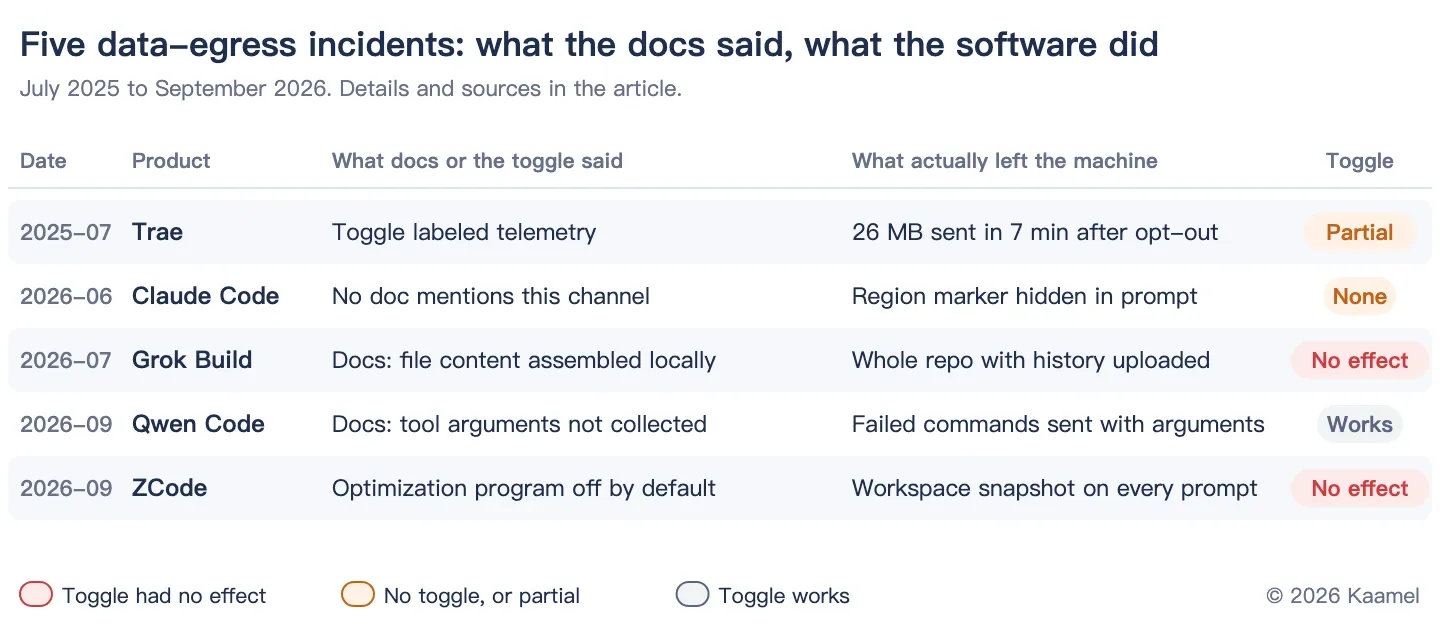
Grok Build uploaded whole repos, ZCode shipped workspace snapshots, Trae kept telemetry on after opt-out. Each checked against its policy; 15 agents compared.
LLM API Privacy Due Diligence: 3+ of 13 Train or Improve on Your Data
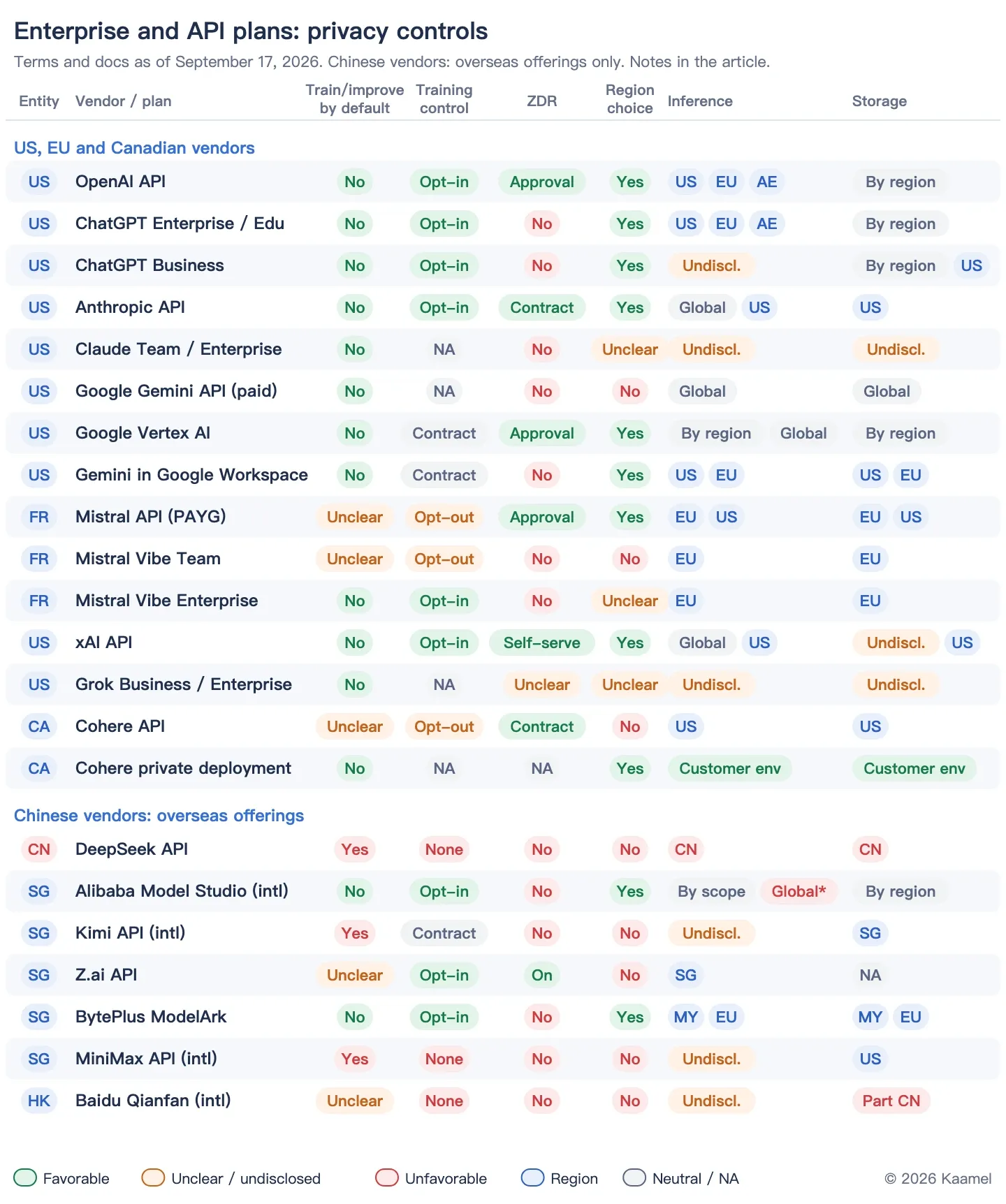
13 LLM APIs from OpenAI to DeepSeek: who trains on or improves with your data by default, who offers ZDR, where inference runs, and who lacks a public DPA.
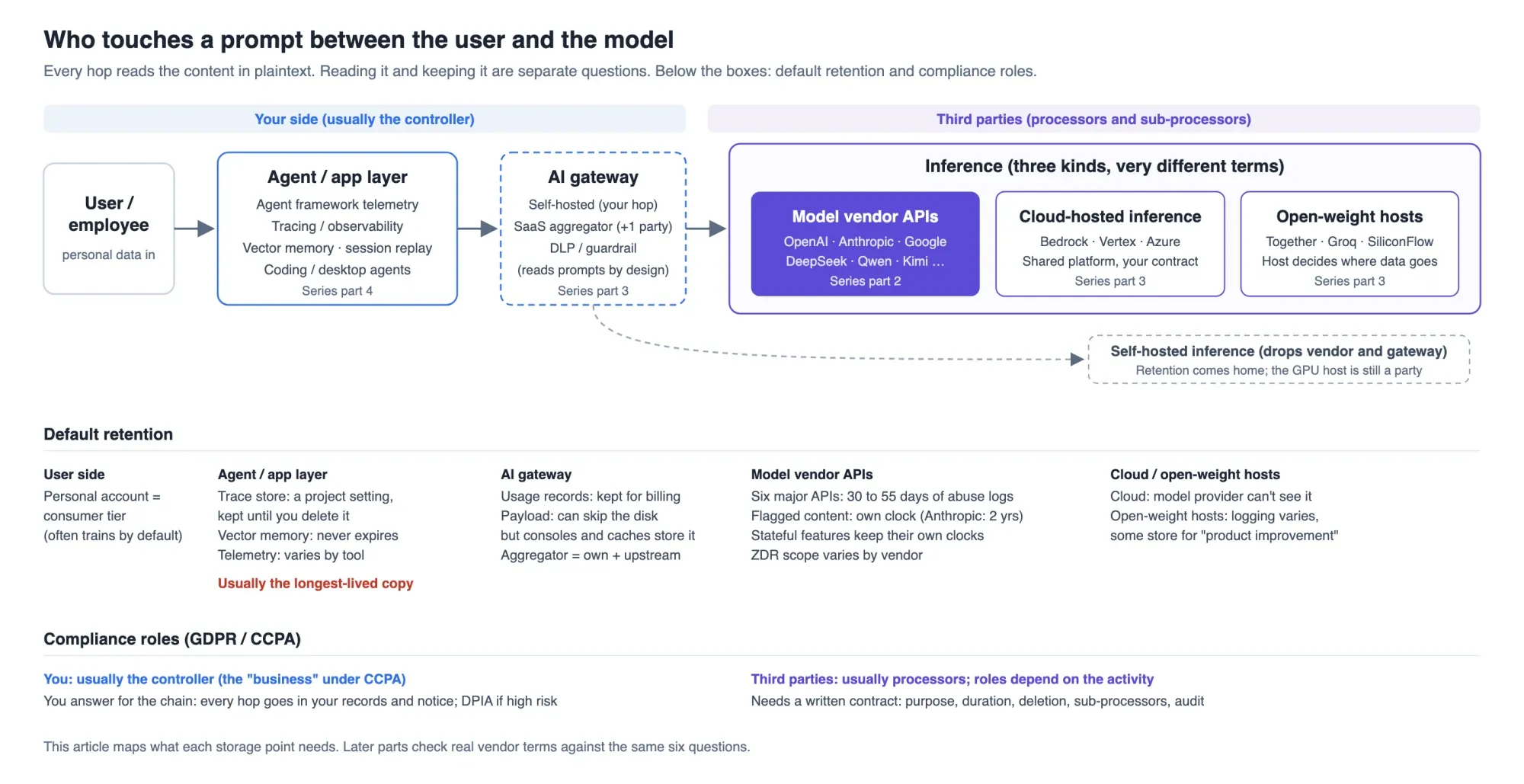
AI Data Compliance Map: The 10 Places a Prompt Gets Stored
A prompt can land in 10 kinds of storage. Six major model APIs keep it 30 to 55 days; trace stores keep it until deleted. How to check each hop.