
Complete Guide to App Store Spring New Requirements
 Garrick Zhu
To help app developers better understand how third-party SDKs use data, protect software dependencies, and provide additional privacy protection for users, Apple introduced new “Privacy Manifest and Signature” for commonly used third-party SDKs at WWDC23. It announced that app developers need to declare the required reason for using a set of APIs in the privacy manifest.
Starting from fall 2023, if app developers upload a new or updated app to App Store Connect that uses required reason APIs without declaring the usage reason in the privacy manifest, Apple will notify the developers via email. From May 1, 2024, App Store Connect will no longer accept apps that do not describe the use of required reason APIs in the privacy manifest. If app developers add an SDK from commonly used third-party SDKs, the same API, privacy manifest, and signature requirements apply. Apps must ensure the use of SDK versions that include the privacy manifest and note that a signature is also required when the SDK is added as a binary dependency.
Before diving into how to meet Apple’s new spring requirements, let’s first familiarize ourselves with some concepts mentioned in these requirements:
What is a privacy manifest file?
To ensure users enjoy transparency and control, Apple launched new tools to make it easier for app developers to provide accurate privacy labels and integrate with App Tracking Transparency. According to the App Store Review Guidelines, app developers are responsible for all code in their apps, including any data collection and tracking behavior. Much of an app’s privacy depends on third-party SDKs, and according to developer feedback, obtaining the necessary information from large third-party SDKs that the app depends on is extremely difficult. The privacy manifest is a new way for third-party SDK developers to provide information about privacy protection operations, which can help app developers accurately describe the app’s privacy.
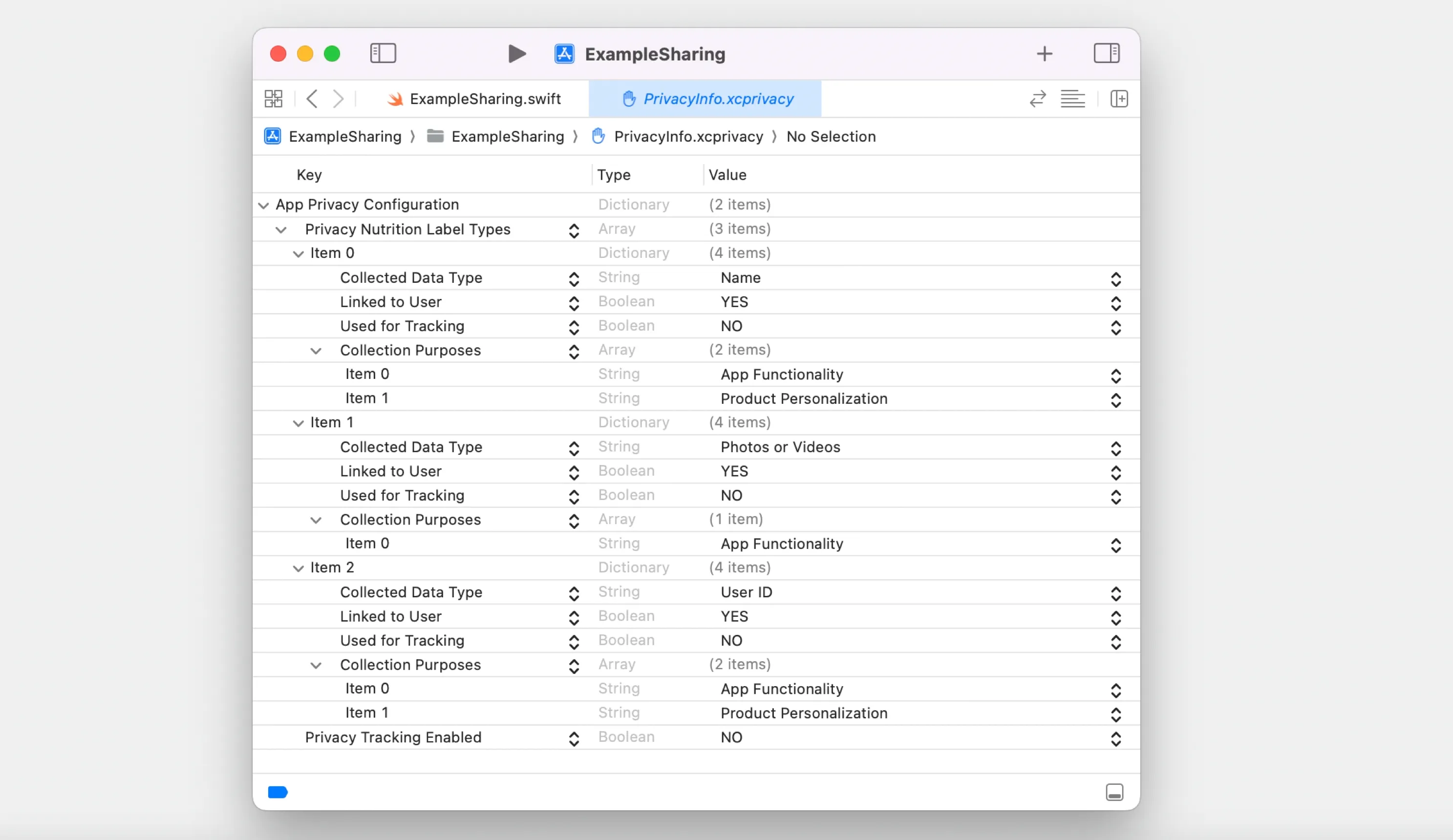
The “Privacy Manifest File” is a property list that records the type of data collected by the app or third-party SDK, how each type of data is used, whether the data is associated with the user, whether the data will be used for tracking as defined by the App Tracking Transparency policy, and records the use of required reasons API by the app or third-party SDK. App developers need to ensure that the privacy manifest matches their understanding of the third-party SDK’s functionality.
What is a privacy report?
In addition to launching the privacy manifest, Apple’s privacy report also summarizes these information.
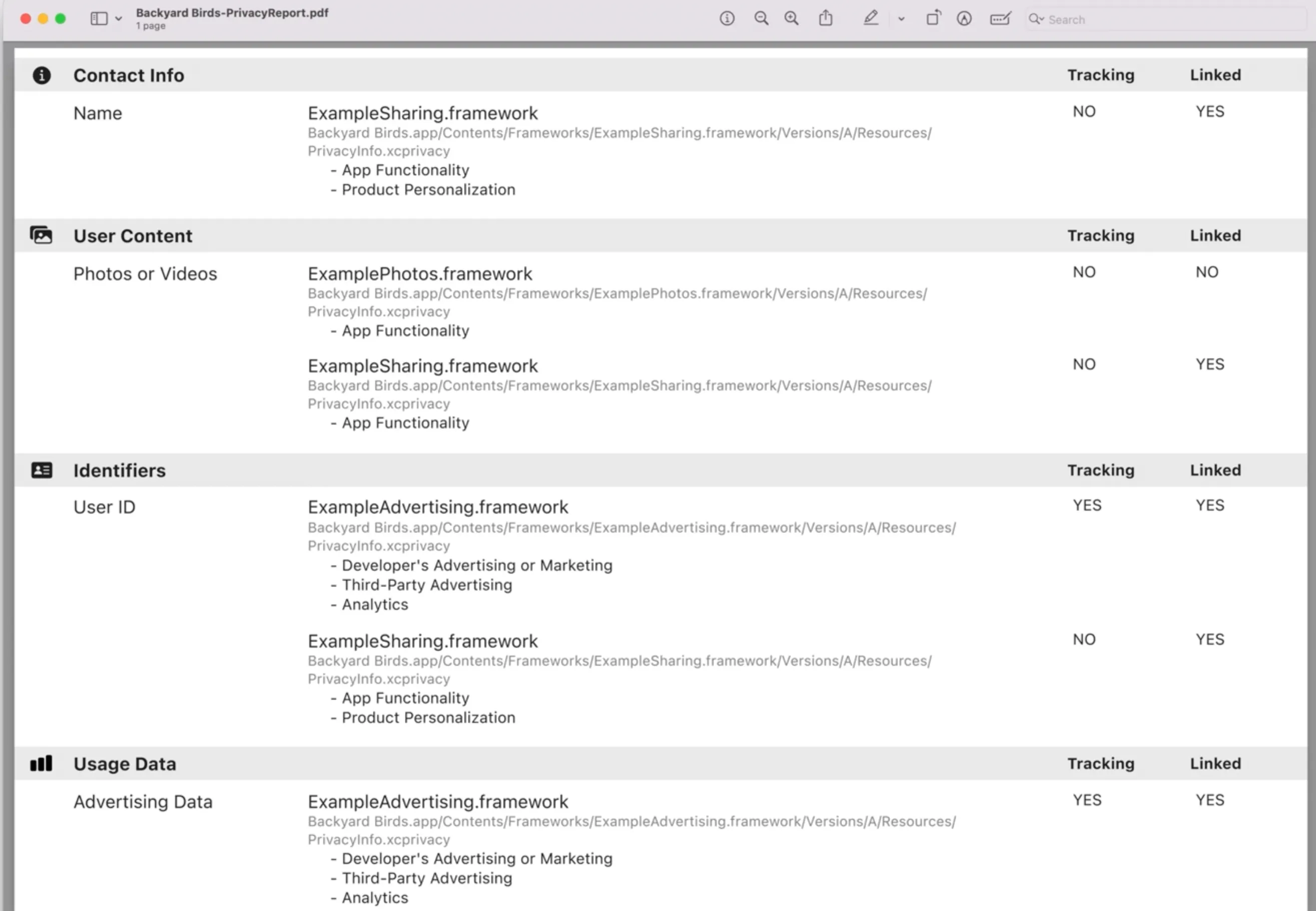
App developers can create a Privacy Report using Xcode, which creates a comprehensive report by summarizing the privacy manifests of the app and any third-party SDKs accessed by the app. The Privacy Report is a PDF organized similarly to the Privacy Labels, making it easy for app developers to reference when providing detailed privacy protection information for their apps to Apple App Store Connect. This helps app developers review, understand, and describe the privacy protection operations of their app dependencies.
What are required reasons APIs?
Some APIs used by the app to deliver its core functions, either in the app’s own code or included in a third-party SDK, can be misused to access device signals in an attempt to identify the device or user, also known as fingerprinting. Fingerprinting is always prohibited, whether or not the user grants the app tracking permission. There are some APIs on the Apple platform that can be misused for fingerprinting, but if used properly, these APIs can also provide powerful user experiences. To support important functions that benefit users while avoiding the use of fingerprinting, Apple introduced a new category of APIs, the required reason APIs.
Apple categorizes these APIs based on their functions and the information they provide, and lists five categories of APIs in “Describing the Use of Required Reasons APIs”: file timestamp APIs, system boot time APIs, disk space APIs, active keyboard APIs, and user default APIs. For each category, Apple provides a list of approved reasons for accessing the required reason APIs based on their functions. If required reasons APIs are used in the code of the app or a third-party SDK, then the developer of the app or third-party SDK needs to report the category of the API and all reasons for using the API in their respective privacy manifest files, and these reasons must be selected from the list of approved reasons for the category and check that the app or third-party SDK uses these APIs only for the intended reasons.
Apple will continuously review the types of required reasons APIs and the list of approved reasons, and publish them on the official website. If the developer’s app uses required reasons APIs to provide benefits to the app’s users, but the approved reason is not on the list, developers can submit a request for new approved reasons.
What are commonly used third-party SDKs?
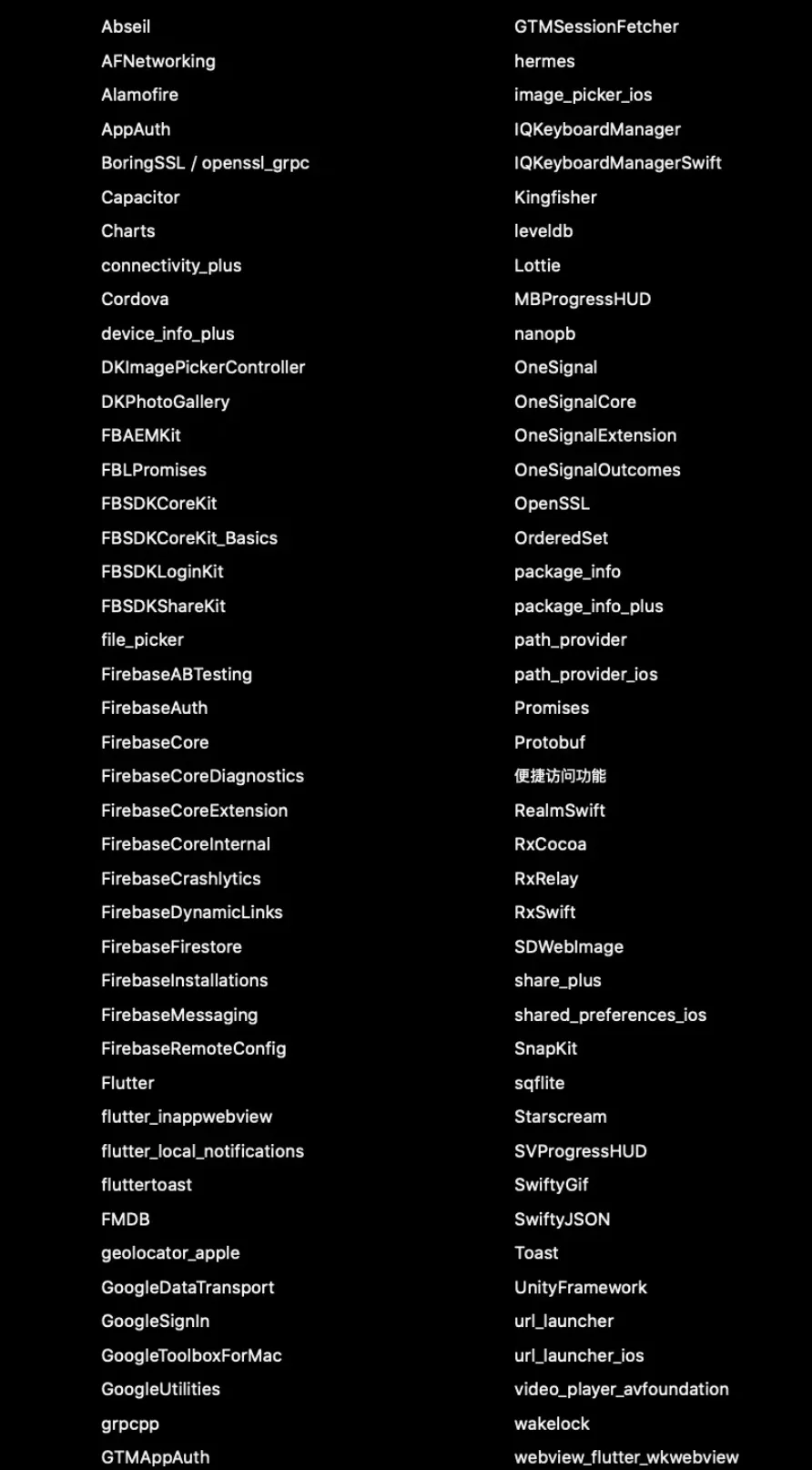
In the app ecosystem, Apple has identified some third-party SDKs that have a significant impact on user privacy, known as “privacy-impacting SDKs.” The list of these third-party SDKs and their future updates will be published in the Apple Developer documentation.
In the article “Upcoming Third-Party SDK Requirements,” Apple listed commonly used third-party SDKs in the App Store, as shown in the following figure:
What do app and SDK developers need to do respectively?
App Developer
- Report required reason API in the privacy manifest App developers need to add a dictionary to the NSPrivacyAccessedAPITypes array in the privacy manifest of the app or third-party SDK for each category of required reason API used by the app or third-party SDK, and report the reasons for using the API category in the privacy manifest:
- If the app developer uses the API in the app’s code, then the developer needs to report the API in the app’s privacy manifest;
- If the app developer uses the API in the code of a third-party SDK, then it needs to be reported in the privacy manifest of the third-party SDK.
Apple emphasizes that the third-party SDK of the app cannot rely on the privacy manifest of the app that accesses it, or the privacy manifest of other third-party SDKs accessed by the app, to report the use of required reason API by the app’s third-party SDK. That is, if a third-party SDK uses required reason API, it must be reported in the privacy manifest of the third-party SDK itself.
As mentioned earlier, starting from May 1, 2024, App Store Connect will no longer accept apps that do not describe the use of required reason APIs in the privacy manifest.
Apple has clearly defined the consequences of violating the reporting obligation of required reason APIs. We understand that from May 1, 2024, Apple will make the reporting obligation of required reason APIs in the privacy manifest a key point of review for new and updated apps, and this obligation must be completed to pass the review of the Apple App Store. For required reason APIs used by the app itself, the app can complete the reporting in the privacy manifest by sorting out its own situation. For required reason APIs used by third-party SDKs accessed by the app, currently in practice, app developers rely on the declaration of the SDK’s use of required reason APIs by the third-party SDK.
- Ensure the use of SDK versions that include the privacy manifest Apple listed the “commonly used third-party SDKs” list in the article “Upcoming Third-Party SDK Requirements.” Starting from spring 2024, when app developers submit new apps containing SDKs from the list to App Store Connect, or when developers submit updates adding one of the SDKs from the list as part of the update, app developers must include the privacy manifest of any SDK from the list. Any version of the SDK from the list, as well as repackaged SDKs from the list, are included in the requirements. From the wording of Apple’s article, this article is also a mandatory audit requirement for new or updated apps. But this article has also caused some controversy among developers. Regarding updated apps, Apple’s requirement is “only when developers submit updates adding one of the commonly used SDKs as part of the update, do they need to ensure the inclusion of the privacy manifest of that SDK.” Many developers have questioned whether app developers must include the privacy manifest of commonly used SDKs in the old version if the old version of the app already contains commonly used SDKs and no additional commonly used SDKs are added during the update. Although Apple’s article has caused some controversy, we still recommend that developers take this requirement seriously. As long as commonly used third-party SDKs are used in the app, developers should update the SDK to a version that includes the privacy manifest before releasing it on the App Store.
- Create a privacy manifest, describing the app’s data use Apple did not require app developers to create a privacy manifest at WWDC23, but from the article “Describing the Data Use in the Privacy Manifest” published on the official website, **all app developers can create their own privacy manifest, and the app’s privacy manifest file does not need to cover the data collected by third-party SDKs accessed by the app. **That is because the situation of third-party SDKs collecting data will be explained in the privacy manifest of the third-party SDK itself. Regarding this requirement, we understand that it will not be a key point for Apple to review new and updated apps. Of course, if the app accesses required reason APIs, developers need to create their own privacy manifest and report the use of the API. But in other cases, creating a privacy manifest is not a mandatory requirement. Although it is not a mandatory requirement, we still recommend that developers create a privacy manifest to describe the app’s data use. Through the tool of the privacy manifest, developers can use a unified format to better outline their privacy practices, thus creating a more comprehensive privacy report and enhancing the transparency of the application.
- Create a privacy report and a more accurate Privacy Nutrition Labels The privacy manifest file outlines the privacy practices of the app itself or third-party code in the app in a single standard format. When app developers are ready to distribute the app, Xcode will merge the app’s privacy manifest and the privacy manifests of all third-party SDKs used by the app into an easy-to-use report. Through a comprehensive report, summarize all third-party SDKs found in the app. The organization of the privacy report is similar to the Privacy Nutrition Labels. Apple recommends that when app developers provide detailed privacy information for their apps in App Store Connect, be sure to refer to the privacy report. In addition, we recommend that the content filled in the privacy manifest should also be consistent with the product privacy policy and product data collection practices, and be updated synchronously.
Third-party SDK providers
- Report required reason API in the privacy manifest As previously stated, “if the app’s developer uses required reason API in the code of a third-party SDK, then the app’s developer needs to report the API in the privacy manifest file of the third-party SDK.” The requirement to report the use of required reason API by the SDK in the privacy manifest of the third-party SDK is given to app developers, but in practice, this requirement will be implemented by app developers contacting the third-party SDK provider to confirm. From May 1, 2024, for new or updated apps that have not reported required reason API in the privacy manifest, the Apple App Store will no longer accept them. And the use of required reason API by third-party SDKs can only be declared in the privacy manifest of the SDK itself. So the requirement to report required reason API in the privacy manifest of the third-party SDK is also a key point of Apple’s review this time.
- Create a privacy manifest and describe data use At WWDC23, Apple introduced new “Privacy Manifest and Signature” requirements for “commonly used third-party SDKs.” App developers using third-party SDKs from the list in the article “Upcoming Third-Party SDK Requirements” to submit new apps or add them as part of updating apps must ensure that the SDK contains a privacy manifest. According to Apple staff’s explanation of the new spring regulations, the implementation method is for app developers to request a privacy manifest from commonly used third-party SDKs. So we understand that the privacy manifest of the third-party SDK should be created by the SDK itself. As previously stated, this article is a mandatory audit requirement for new or updated apps. We recommend that developers take this requirement seriously. As long as it belongs to commonly used third-party SDKs, it should prepare its own privacy manifest for app developers to use.
- Signature Xcode 15 also supports SDK signatures, which will help protect the app and verify the authenticity of third-party SDKs. Third-party SDKs from the list in the article “Upcoming Third-Party SDK Requirements,” and used as binary dependencies, must ensure that the SDK is signed.
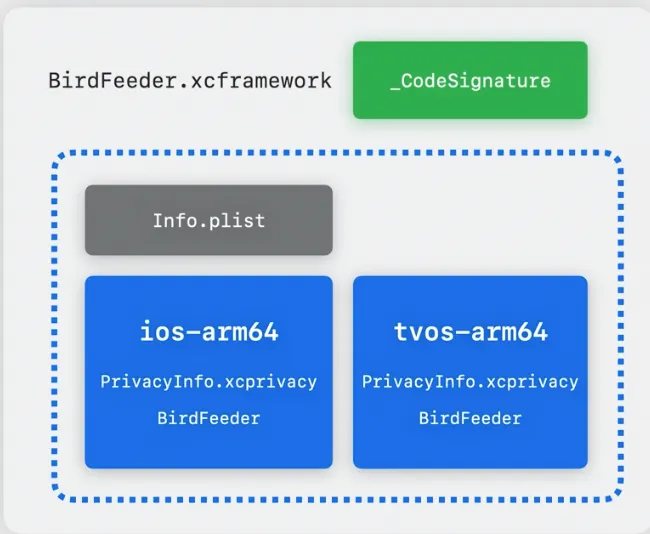
In addition to the requirement to report access to required reason API in the privacy manifest, which applies to all third-party SDKs, the requirements for creating a privacy manifest and signature are only mandatory for commonly used third-party SDKs in Apple’s new regulations. But as Apple staff mentioned, including a privacy manifest and signature is best practice for third-party SDKs, to enhance data transparency, protect the app, and verify the authenticity of third-party SDKs, we recommend that all third-party SDKs create their own privacy manifest and signature.
How to create a privacy manifest and privacy report?
Create a privacy manifest
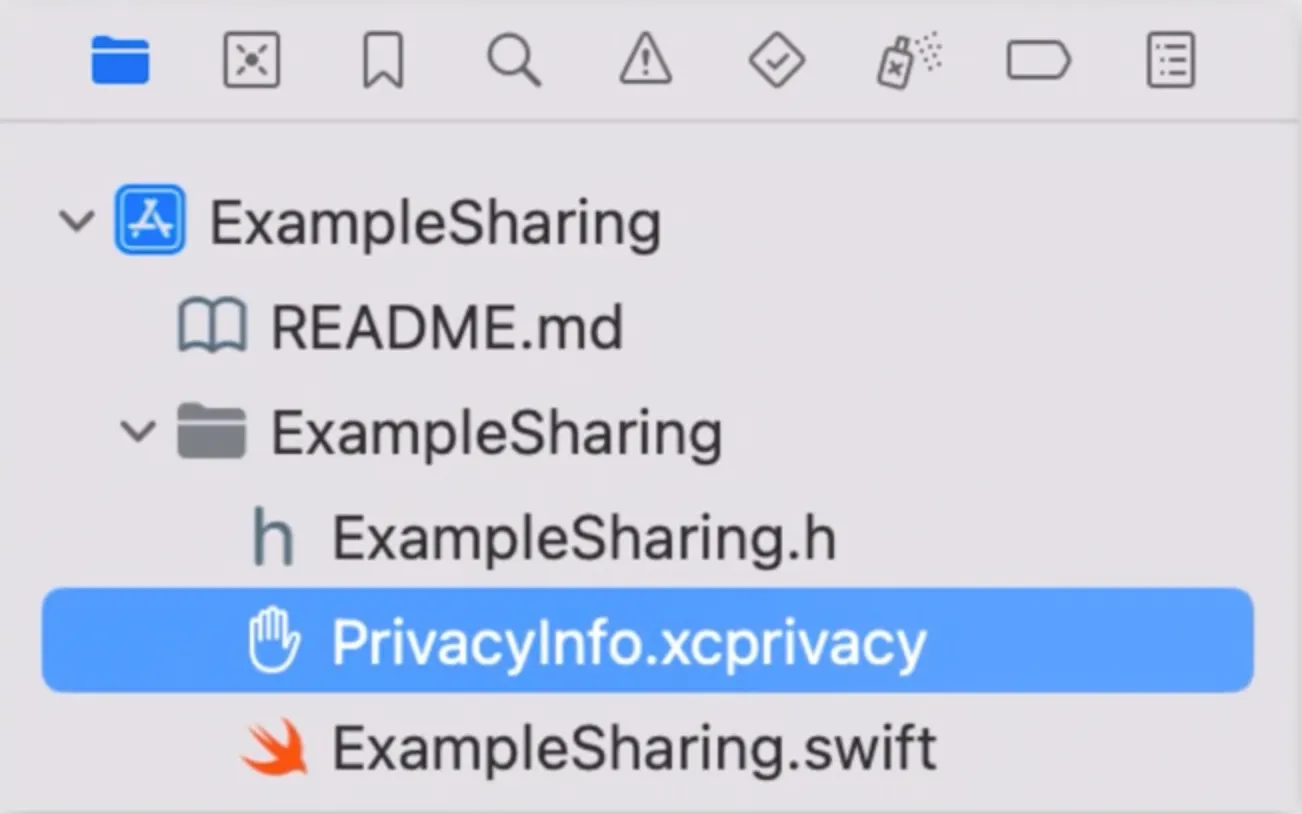
Add a privacy manifest to the app or third-party SDK in Xcode by following these steps:
- Select File>New File.
- Scroll down to the Resources section, then select the App Privacy file type.
- Click Next.
- Check the target for the app or third-party SDK in the target list.
- Click Create. By default, the file name is PrivacyInfo.xcprivacy; this is the required file name for the privacy manifest.
Create a privacy report
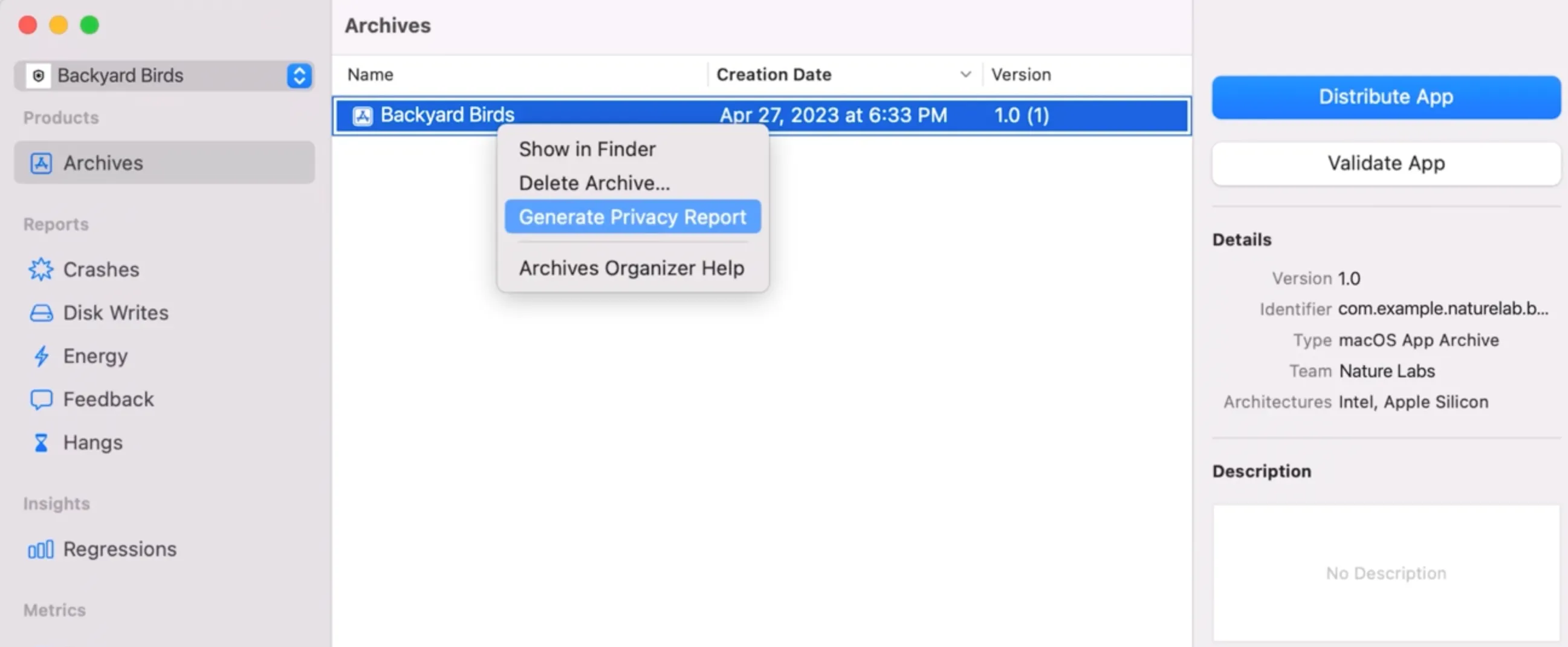
- Open the project in Xcode.
- Select Product>Archive. Xcode creates an archive and displays it in the organizer.
- Hold down the Control key and click the archive in the organizer, then select Generate Privacy Report.
- Select a location to save the privacy report.
- Switch to Finder.
- Navigate to the location where the privacy report is saved, then double-click to open the report in Preview.
How to describe data use in the privacy manifest?
Describe the data collected by the app or third-party SDK
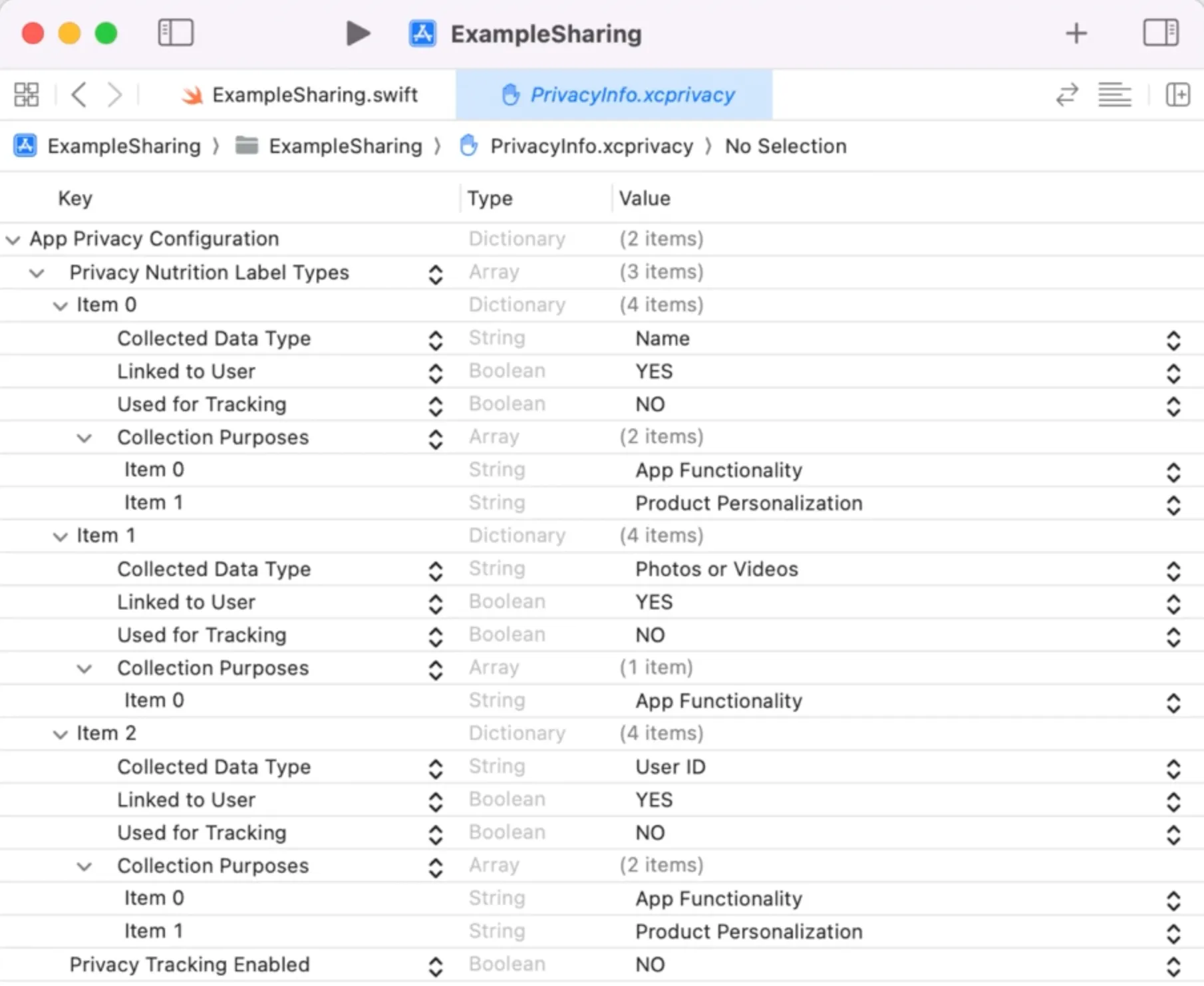
For each type of data collected by the app or third-party SDK, add a dictionary to the NSPrivacyCollectedDataTypes array in the privacy manifest file, adding the following key values into the dictionary. Apple has made formatting requirements and definitions for the key values in the dictionary, which are:
- NSPrivacyCollectedDataType: The type of data collected;
- NSPrivacyCollectedDataTypeLinked: Whether this type of data is associated with the user’s identity;
- NSPrivacyCollectedDataTypeTracking: Whether this type of data is used to track users;
- NSPrivacyCollectedDataTypePurposes: The purpose of collecting data.
Apple has clearly defined a selectable range list for NSPrivacyCollectedDataType and NSPrivacyCollectedDataTypePurposes. If app or third-party SDK developers customize the values of these two items, Xcode will not be able to generate the correct privacy report. That is, for the aforementioned two items, developers can only select values from Apple’s selectable range list that match their own app or third-party SDK, otherwise they cannot generate the correct privacy report.
Selectable range for NSPrivacyCollectedDataType
| Data Type | Value | Description | |
|---|---|---|---|
| Contact Info | Name | NSPrivacyCollectedDataTypeName | Your first or last name |
| Email Address | NSPrivacyCollectedDataTypeEmailAddress | Including but not limited to hashed email addresses | |
| Phone Number | NSPrivacyCollectedDataTypePhoneNumber | Including but not limited to hashed phone number | |
| Physical Address | NSPrivacyCollectedDataTypePhysicalAddress | For example, home address, physical address, or mailing address | |
| Other User Contact Info | NSPrivacyCollectedDataTypeOtherUserContactInfo | Any other information that can be used to contact the user outside the app | |
| Health&Fitness | Health | NSPrivacyCollectedDataTypeHealth | Health and medical data, including but not limited to data from the Clinical Health Records API, HealthKit API, MovementDisorderAPIs, or data related to health-related human studies or any other health or medical data provided by users. |
| Fitness | NSPrivacyCollectedDataTypeFitness | Fitness and exercise data, including but not limited to the Motion and Fitness API. | |
| Financial | Payment Info | NSPrivacyCollectedDataTypePaymentInfo | For example, payment methods, payment card numbers, or bank account information. If the app uses payment services, payment information will be entered outside the app, and developers will never have access to the payment information; therefore, it will not be collected and thus does not need to be disclosed. |
| Credit Info | NSPrivacyCollectedDataTypeCreditInfo | Credit score | |
| Other Financial Info | NSPrivacyCollectedDataTypeOtherFinancialInfo | For example, salary, income, assets, debts, or any other financial information. | |
| Location | Precise Location | NSPrivacyCollectedDataTypePreciseLocation | Information describing the location of the user or device, with latitude and longitude coordinates accurate to three or more decimal places. |
| Coarse Location | NSPrivacyCollectedDataTypeCoarseLocation | Information describing the user or device’s location, with latitude and longitude coordinates accurate to less than three decimal places, such as approximate location services. | |
| Sensitive Info | Sensitive Info | NSPrivacyCollectedDataTypeSensitiveInfo | For example, racial or ethnic data, sexual orientation, pregnancy or childbirth information, disabilities, religious or philosophical beliefs, trade union membership, political opinions, genetic information, or biometric data. |
| Contacts | Contacts | NSPrivacyCollectedDataTypeContacts | For example, the list of contacts in the user’s phone, address book, or social graph. |
| User Content | Emails Or Text Messages | NSPrivacyCollectedDataTypeEmailsOrTextMessages | Including the subject line, sender, recipient, and the content of the email or message. |
| Photos or Videos | NSPrivacyCollectedDataTypePhotosorVideos | The user’s photos or videos. | |
| 音频数据 | NSPrivacyCollectedDataTypeAudioData | The user’s voice or audio recordings. | |
| Gameplay Content | NSPrivacyCollectedDataTypeGameplayContent | For example, saved games, multiplayer matchmaking, game logic, or user-generated content within a game. | |
| Customer Support | NSPrivacyCollectedDataTypeCustomerSupport | Data generated by the user during customer support requests. | |
| Other User Content | NSPrivacyCollectedDataTypeOtherUserContent | Any other user-generated content. | |
| Browsing History | Browsing History | NSPrivacyCollectedDataTypeBrowsingHistory | Information about the content viewed by the user that is not part of the app, such as websites. |
| Identifier | User ID | NSPrivacyCollectedDataTypeUserID | For example, screen names, handles, account IDs, assigned user IDs, customer numbers, or other user or account-level IDs that can be used to identify a specific user or account. |
| Device ID | NSPrivacyCollectedDataTypeDeviceID | For example, the device’s advertising identifier or other device-level IDs. | |
| Purchase | Purchase History | NSPrivacyCollectedDataTypePurchaseHistory | Purchase data or purchasing trends of an account or individual. |
| Usage Data | Product Interaction | NSPrivacyCollectedDataTypeProductInteraction | For example, app launches, taps, clicks, scroll information, music listening data, video viewing, saved positions in games, videos, or songs, or other information about how the user interacts with the app. |
| Advertising Data | NSPrivacyCollectedDataTypeAdvertisingData | For example, information about the advertisements that the user has viewed. | |
| Other Usage Data | NSPrivacyCollectedDataTypeOtherUsageData | Any other data about user activity within the app. | |
| Other Diagnostic Data | Crash Data | NSPrivacyCollectedDataTypeCrashData | For example, crash logs. |
| Performance Data | NSPrivacyCollectedDataTypePerformanceData | For example, launch times, hang rates, or energy usage. | |
| Other Diagnostic Data | NSPrivacyCollectedDataTypeOtherDiagnosticData | Any other data collected for measuring technical diagnostics related to the app. | |
| Environment | Environment Scanning | NSPrivacyCollectedDataTypeEnvironmentScanning | For example, mesh, plane, scene classification, and/or image detection of the user’s surrounding environment. |
| Body | Hands | NSPrivacyCollectedDataTypeHands | The user’s hand structure and hand movements. |
| Head | NSPrivacyCollectedDataTypeHead | The user’s head movements. | |
| Other Data Types | Other Data Types | NSPrivacyCollectedDataTypeOtherDataTypes | Any other data types not mentioned. |
Selectable range for NSPrivacyCollectedDataTypePurposes
| Purpose | Value | Description |
|---|---|---|
| Third Party Advertising | NSPrivacyCollectedDataTypePurposeThirdPartyAdvertising | For example, displaying third-party advertisements within the app or sharing data with entities that display third-party advertisements. |
| Developer Advertising | NSPrivacyCollectedDataTypePurposeDeveloperAdvertising | For example, displaying first-party advertisements within the app, sending marketing communications directly to users, or sharing data with entities that display developer advertisements. |
| Analytics | NSPrivacyCollectedDataTypePurposeAnalytics | Using data to assess user behavior includes understanding the effectiveness of existing product features, planning new features, or measuring audience size or characteristics. |
| Product Personalization | NSPrivacyCollectedDataTypePurposeProductPersonalization | Customizing the content users see, such as recommended products, posts, or suggested lists. |
| App Functionality | NSPrivacyCollectedDataTypePurposeAppFunctionality | For example, verifying user identity, enabling features, preventing fraud, implementing security measures, ensuring server uptime, minimizing application crashes, improving scalability and performance, or providing customer support. |
| Other | NSPrivacyCollectedDataTypePurposeOther | Any other purposes not listed. |
The figure below shows an example of the content of the privacy manifest provided by Apple. From the figure, it can be seen that when filling in the content of the privacy manifest, developers should use the type of data collected as the dimension: list the type of data collected, whether the data is associated with the user, whether the data will be used to track customers, and the purpose of collecting the data. When there are multiple purposes for collecting data, they all need to be listed.
How to describe the use of required reasons APIs in the privacy manifest?
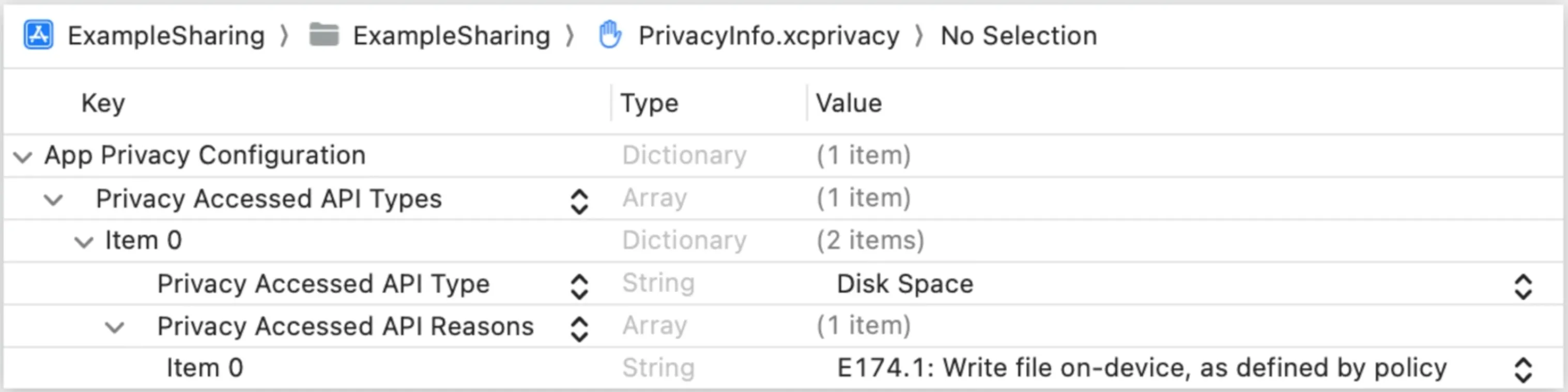
If required reasons APIs are used in the code of the app or a third-party SDK, then the developer of the app or third-party SDK needs to report the API in their respective privacy manifest files, as shown in the figure above, declare the API category and all reasons for using the API, and these reasons must be selected from the list of approved reasons for the category, as shown in the table below. As previously stated, if developers use required reasons APIs to provide business functions to users of the app, but the approved reason is not on the list, developers can submit a request for new approved reasons. The content reported in the privacy manifest must accurately reflect the use of these APIs and the data generated by their use. Developers can only use these APIs and the data obtained from them for the declared reasons, and these declared reasons must be consistent with the functions presented to users in the app, and APIs or API-derived data cannot be used to track users.
| API Category | Value | API Name | Reasons to Use |
|---|---|---|---|
| File timestamp APIs | NSPrivacyAccessedAPICategoryFileTimestamp | • creationDate • modificationDate • fileModificationDateKey • contentModificationDateKey • getattrlist(:::::) • getattrlistbulk(:::::) • fgetattrlist(:::::) • stat • fstat(::) • fstatat(::::) • lstat(::) • getattrlistat(:::::_:) | DDA9.1 Declare this reason to display file timestamps to the person using the device. Information accessed for this reason, or any derived information, may not be sent off-device. C617.1 Declare this reason to access the timestamps, size, or other metadata of files inside the app container, app group container, or the app’s CloudKit container. 3B52.1 Declare this reason to access the timestamps, size, or other metadata of files or directories that the user specifically granted access to, such as using a document picker view controller. 0A2A.1 Declare this reason if your third-party SDK is providing a wrapper function around file timestamp API(s) for the app to use, and you only access the file timestamp APIs when the app calls your wrapper function. This reason may only be declared by third-party SDKs. This reason may not be declared if your third-party SDK was created primarily to wrap required reason API(s). Information accessed for this reason, or any derived information, may not be used for your third-party SDK’s own purposes or sent off-device by your third-party SDK. |
| System boot time APIs | NSPrivacyAccessedAPICategorySystemBootTime | • systemUptime • mach_absolute_time( ) | 35F9.1 Declare this reason to access the system boot time in order to measure the amount of time that has elapsed between events that occurred within the app or to perform calculations to enable timers. Information accessed for this reason, or any derived information, may not be sent off-device. There is an exception for information about the amount of time that has elapsed between events that occurred within the app, which may be sent off-device. 8FFB.1 Declare this reason to access the system boot time to calculate absolute timestamps for events that occurred within your app, such as events related to the UIKit or AVFAudio frameworks. Absolute timestamps for events that occurred within your app may be sent off-device. System boot time accessed for this reason, or any other information derived from system boot time, may not be sent off-device. 3D61.1 Declare this reason to include system boot time information in an optional bug report that the person using the device chooses to submit. The system boot time information must be prominently displayed to the person as part of the report. Information accessed for this reason, or any derived information, may be sent off-device only after the user affirmatively chooses to submit the specific bug report including system boot time information, and only for the purpose of investigating or responding to the bug report. |
| Disk space APIs | NSPrivacyAccessedAPICategoryDiskSpace | • volumeAvailableCapacityKey • volumeAvailableCapacityForImportantUsageKey • volumeAvailableCapacityForOpportunisticUsageKey • volumeTotalCapacityKey • systemFreeSize • systemSize • statfs(::) • statvfs(::) • fstatfs(::) • fstatvfs(::) • getattrlist(:::::) • fgetattrlist(:::::) • getattrlistat(::::::) | 85F4.1 Declare this reason to display disk space information to the person using the device. Disk space may be displayed in units of information (such as bytes) or units of time combined with a media type (such as minutes of HD video). Information accessed for this reason, or any derived information, may not be sent off-device. There is an exception that allows the app to send disk space information over the local network to another device operated by the same person only for the purpose of displaying disk space information on that device; this exception only applies if the user has provided explicit permission to send disk space information, and the information may not be sent over the Internet. E174.1 Declare this reason to check whether there is sufficient disk space to write files, or to check whether the disk space is low so that the app can delete files when the disk space is low. The app must behave differently based on disk space in a way that is observable to users. Information accessed for this reason, or any derived information, may not be sent off-device. There is an exception that allows the app to avoid downloading files from a server when disk space is insufficient. 7D9E.1 Declare this reason to include disk space information in an optional bug report that the person using the device chooses to submit. The disk space information must be prominently displayed to the person as part of the report. Information accessed for this reason, or any derived information, may be sent off-device only after the user affirmatively chooses to submit the specific bug report including disk space information, and only for the purpose of investigating or responding to the bug report. B728.1 Declare this reason if your app is a health research app, and you access this API category to detect and inform research participants about low disk space impacting the research data collection. Your app must comply with App Store Review Guideline §5.1.3. Your app must not offer any functionality other than providing information about and allowing people to participate in health research. |
| Active keyboard APIs | NSPrivacyAccessedAPICategoryActiveKeyboards | • activeInputModes | 3EC4.1 Declare this reason if your app is a custom keyboard app, and you access this API category to determine the keyboards that are active on the device. Providing a systemwide custom keyboard to the user must be the primary functionality of the app. Information accessed for this reason, or any derived information, may not be sent off-device. 54BD.1 Declare this reason to access active keyboard information to present the correct customized user interface to the person using the device. The app must have text fields for entering or editing text and must behave differently based on active keyboards in a way that is observable to users. Information accessed for this reason, or any derived information, may not be sent off-device. |
| User defaults APIs | NSPrivacyAccessedAPICategoryUserDefaults | • UserDefaults | CA92.1 Declare this reason to access user defaults to read and write information that is only accessible to the app itself. This reason does not permit reading information that was written by other apps or the system, or writing information that can be accessed by other apps. 1C8F.1 Declare this reason to access user defaults to read and write information that is only accessible to the apps, app extensions, and App Clips that are members of the same App Group as the app itself. This reason does not permit reading information that was written by apps, app extensions, or App Clips outside the same App Group or by the system. Your app is not responsible if the system provides information from the global domain because a key is not present in your requested domain while your app is attempting to read information that apps, app extensions, or App Clips in your app’s App Group write. This reason also does not permit writing information that can be accessed by apps, app extensions, or App Clips outside the same App Group. C56D.1 Declare this reason if your third-party SDK is providing a wrapper function around user defaults API(s) for the app to use, and you only access the user defaults APIs when the app calls your wrapper function. This reason may only be declared by third-party SDKs. This reason may not be declared if your third-party SDK was created primarily to wrap required reason API(s). Information accessed for this reason, or any derived information, may not be used for your third-party SDK’s own purposes or sent off-device by your third-party SDK. AC6B.1 Declare this reason to access user defaults to read the com.apple.configuration.managed key to retrieve the managed app configuration set by MDM, or to set the com.apple.feedback.managed key to store feedback information to be queried over MDM, as described in the Apple Mobile Device Management Protocol Reference documentation. |
Related reading

EU Kids Act: Proposed Age-Based Restrictions on Minors’ Social Media Use
The EU Kids Act draft sets out age-based access rules, safer design, AI safeguards and audits. We examine the proposed changes and their implications for products.
Indonesia’s PDPL Implementing Regulation: Key GDPR Differences
How Indonesia’s PP 33/2026 and PDPL differ from the GDPR on contracts, individual rights, processing records, breach notices and international transfers.

ChatGPT Is Now a VLOSE Under the DSA: What Changes?
The European Commission has designated ChatGPT as a very large online search engine. We explain the DSA threshold and six additional duties that follow.